# Google Cloud Functions on .NET
Author: [Mete Atamel](https://atamel.dev/) | Published: 2020-07-14 | Updated: 2025-11-21 | Topics: dotnet, dotnetcore, google cloud, serverless | Canonical: https://atamel.dev/posts/2020/07-14_dotnet_on_cloud_functions/
## .NET for Google Cloud Functions (Alpha)
I spoke at many .NET conferences over the last 3-4 years and one of the top
requests I always received was: When will .NET be supported on Cloud Functions?
Unfortunately, I didn't have a good answer for a while. That all changed last
month with the following tweet from [Jon Skeet](https://twitter.com/jonskeet) from our C#
team:
{{< x user="jonskeet" id="1270748026227904513" >}}
.NET support is coming to Cloud Functions and it is currently public alpha. You need to sign up
[here](https://docs.google.com/forms/d/e/1FAIpQLSe7qB5vNrgFtZZ3ZUfIwkbsDMGsA1fXY52GzmGmnhwdReHuOQ/viewform)
to gain access.
In this blog post, I want to give the .NET support of Cloud Functions a try and
see how it works. Along the way, we'll also learn about [Functions
Framework](https://github.com/GoogleCloudPlatform/functions-framework) that
powers the .NET support of Cloud Functions under the covers.
All the code I'll share here are already in my GitHub repo:
[cloud-functions-dotnetcore](https://github.com/meteatamel/cloud-functions-dotnetcore).
## Why Cloud Functions
Before I dive into the .NET support of Cloud Functions, one question that's worth
answering is: Why Cloud Functions for .NET? There are already multiple ways of
running .NET on Google Cloud, so why one more?
To recap the current options, you can run .NET Framework on Windows on Compute Engine
or .NET Core containers on Linux in App Engine (Flex), Kubernetes
Engine and most recently Cloud Run. Cloud Run has been my default choice to run
.NET Core because of its fast deployments, its awesome DevEx and its serverless
scaling and billing model. However, the unit of deployment in Cloud Run is a
container. Going from .NET code to a Docker image via Dockerfile is usually
straightforward but not trivial. Making sure that the Dockerfile is
optimized and secure is even more work.
Sometimes, you just want to write code and deploy it without having to worry
about containers. This is what Cloud Functions enable you to do. Cloud Functions
also tend to have better integration with different Google Cloud events, as of today.
## Functions Framework
[Functions
Framework](https://github.com/GoogleCloudPlatform/functions-framework) tries
to simplify writing and deploying portable functions across different platforms such
as Cloud Functions, Cloud Run, Cloud Run on GKE or pure Knative. It's also
useful for local development and debugging. It supports `HTTP` and `CloudEvent`
consuming functions.
[Functions Framework for
.NET](https://github.com/GoogleCloudPlatform/functions-framework-dotnet) does
the same for .NET and it is the foundation for the .NET support in Cloud Functions.
## Templates for Cloud Functions
Functions Framework for .NET comes with some templates for `dotnet` to make
it easier to get started. Installing templates is a single command:
```sh
dotnet new -i Google.Cloud.Functions.Templates::1.0.0-alpha08
```
You'll see the following new templates:
```sh
Templates Short Name Language Tags
--------------------------------------------------------------------------------------------------------------------------------
Google Cloud Functions CloudEvent Function gcf-event [C#], F#, VB Google/Cloud/Functions/Events
Google Cloud Functions CloudEvent Function (Untyped) gcf-untyped-event [C#], F#, VB Google/Cloud/Functions/Events
Google Cloud Functions HttpFunction gcf-http [C#], F#, VB Google/Cloud/Functions/Http
```
The first two for `CloudEvent` consuming functions and the last one is for
`HTTP` consuming functions. We'll explore all next.
## HTTP Function
Creating an `HTTP` consuming function is as easy as:
```sh
dotnet new gcf-http
```
This creates a new project with a
[Function.cs](https://github.com/meteatamel/cloud-functions-dotnetcore/blob/master/HelloHttpFunction/Function.cs)
file:
```csharp
public class Function : IHttpFunction
{
///
/// Logic for your function goes here.
///
/// The HTTP context, containing the request and the response.
/// A task representing the asynchronous operation.
public async Task HandleAsync(HttpContext context)
{
await context.Response.WriteAsync("Hello, Functions Framework.");
}
}
```
This is the function that will handle `HTTP` requests and send `HTTP` responses back.
I like the simplicity of the API and it's a bonus that we don't need to worry
about containers.
To deploy the function, you'd use `dotnet3` runtime and `trigger-http` flag:
```sh
gcloud functions deploy hello-http-function \
--runtime dotnet3 \
--trigger-http \
--entry-point HelloHttpFunction.Function
```
In a minute or two, you should see the function deployed:
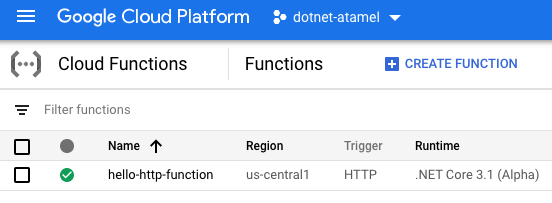
## CloudEvent Function
Functions Framework for .NET starts shining when you start consuming
`CloudEvents`. The framework does a good job in not only parsing the
`CloudEvent` but it also tries to parse the data within the `CloudEvent` into
strong types.
For example, Google Cloud Storage emits `CloudEvents`. To consume those
events, you'd first create a `CloudEvent` consuming function:
```sh
dotnet new gcf-event
```
This creates a
[Function.cs](https://github.com/meteatamel/cloud-functions-dotnetcore/tree/master/HelloCloudEventStorageFunction)
that parses a `CloudEvent` and also the data of the `CloudEvent` into a
`StorageObjectData` object:
```csharp
public class Function : ICloudEventFunction
{
public Task HandleAsync(CloudEvent cloudEvent, StorageObjectData data, CancellationToken cancellationToken)
{
```
This is very useful! To deploy the function, you need to specify the
`trigger-event` and `trigger-resource` accordingly:
```sh
gcloud functions deploy hello-cloudevent-storage-function \
--runtime dotnet3 \
--entry-point HelloCloudEventStorageFunction.Function \
--trigger-event google.storage.object.finalize \
--trigger-resource ${BUCKET_NAME} \
--allow-unauthenticated
```
If you want to consume Pub/Sub messages instead, you can
go through the same process but change `StorageObjectData` to
`MessagePublishedData` in
[Function.cs](https://github.com/meteatamel/cloud-functions-dotnetcore/blob/master/HelloCloudEventPubSubFunction/Function.cs)
to make sure the data is parsed for Pub/Sub message:
```csharp
public class Function : ICloudEventFunction
{
public Task HandleAsync(CloudEvent cloudEvent, MessagePublishedData data, CancellationToken cancellationToken)
{
```
And you need to deploy with `trigger-topic` in this case:
```sh
gcloud functions deploy hello-cloudevent-pubsub-function \
--runtime dotnet3 \
--entry-point HelloCloudEventPubSubFunction.Function \
--trigger-topic ${TOPIC_NAME}
```
You can see the full list of what triggers are supported in a strongly typed way
in
[deployment](https://github.com/GoogleCloudPlatform/functions-framework-dotnet/blob/master/docs/deployment.md)
page.
If you simply want to listen for `CloudEvent` without parsing the specific
`data` type, you can create an untyped function as follows:
```sh
dotnet new gcf-untyped-event
```
This creates a
[Function.cs](https://github.com/meteatamel/cloud-functions-dotnetcore/blob/master/HelloCloudEventUntypedFunction/Function.cs)
with a simple `CloudEvent` signature:
```csharp
public class Function : ICloudEventFunction
{
public Task HandleAsync(CloudEvent cloudEvent, CancellationToken cancellationToken)
{
```
## Dependency injection
The last thing I want to mention with the .NET support in Cloud Functions is its
handy dependency injection.
For example, if you want the logger to be injection into your functions, you can
simply add the following to your `Function.cs`:
```csharp
private readonly ILogger _logger;
public Function(ILogger logger) =>
_logger = logger;
```
In you need to do more complicated dependency injection, you can create a
`Startup.cs` class extending `FunctionsStartup` and do additional injection in
`Configure` method as shown in [Function.cs](https://github.com/GoogleCloudPlatform/functions-framework-dotnet/blob/master/examples/Google.Cloud.Functions.Examples.AdvancedDependencyInjection/Function.cs):
```csharp
public class Startup : FunctionsStartup
{
public override void Configure(IFunctionsHostBuilder builder) =>
builder.Services
.AddSingleton()
.AddScoped();
}
```
---
This wraps up my discussion of .NET on Cloud Functions. Exciting times for .NET
on Google Cloud for sure!
* Sign up for public alpha
[here](https://docs.google.com/forms/d/e/1FAIpQLSe7qB5vNrgFtZZ3ZUfIwkbsDMGsA1fXY52GzmGmnhwdReHuOQ/viewform).
* Check out my code and instructions
[here](https://github.com/meteatamel/cloud-functions-dotnetcore).
* Questions/comments? Reach out to me on Twitter ([@meteatamel](https://twitter.com/meteatamel)).