# Running Wasm in a container
Author: [Mete Atamel](https://atamel.dev/) | Published: 2023-06-29 | Updated: 2023-07-01 | Topics: Wasm, Serverless, How To | Canonical: https://atamel.dev/posts/2023/06-29_run_wasm_in_docker/
Docker recently announced experimental support for running Wasm modules (see
[Announcing Docker+Wasm Technical Preview
2](https://www.docker.com/blog/announcing-dockerwasm-technical-preview-2/)). In
this blog post, I explain what this means and how to run a Wasm module in
Docker.
## Why run Wasm in a container?
In my [Exploring WebAssembly outside the
browser](https://atamel.dev/posts/2023/06-20_explore_wasm_outside_browser/)
post, I mentioned how Wasm is faster, smaller, more secure, and more portable
than a container. You might be wondering: **Why take something faster, smaller,
more secure, and more portable and run it in a container?**
That’s a very good question. By running Wasm in a container, you’re combining
the benefits of both. You get the benefits of a Wasm runtime but you also get
the benefits of containers with namespaces and cgroups. More importantly,
containers have a vast ecosystem around them with Docker, Docker Hub, Kubernetes
etc. It’d be a shame to throw away this ecosystem and reinvent a new one just
for Wasm. Instead, Wasm can play in this ecosystem.
In my view, the future will be Wasm modules running as is, without having to
wrap them in containers. The current state is probably a stepping stone to that
future but we’ll see how this space evolves.
Before we dive into details, let’s first do a recap of how containers are
managed today.
## containerd and runc
Docker (and Kubernetes) relies on a container runtime called `containerd` which
in turn relies on `runc` to manage containers. At the high level, it looks like
this:
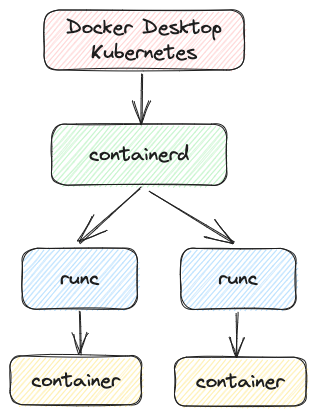
Technically, there’s a `shim` between `containerd` and `runc` but let’s leave
that out of our discussion right now.
## runwasi
 To run Wasm modules, you need a Wasm runtime. That’s when
[runwasi](https://github.com/deislabs/runwasi) comes into picture.
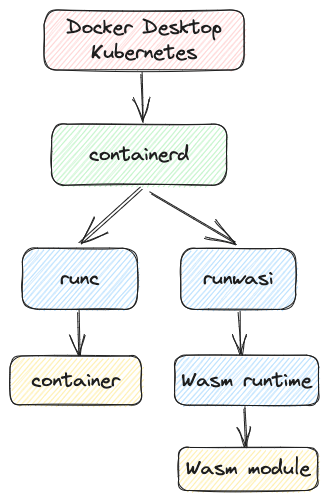
`runwasi` is a project to integrate Wasm runtimes with `containerd` to enable
`containerd` to manage the lifecycle of Wasm modules. It supports Wasm runtimes
such as `wasmtime` and `wasmedge`.
With `runwasi`, Docker and Kubernetes can now use `containerd` to run Wasm
modules alongside with regular containers:
## Wasm runtime support in Docker
Now that we understand how `containerd` can manage Wasm modules using `runwasi`,
let’s look into what Docker actually supports today.
In the [Announcing Docker+Wasm Technical Preview
2](https://www.docker.com/blog/announcing-dockerwasm-technical-preview-2/) post,
Docker announced support for 3 new Wasm runtimes, in addition to the existing
runtime. This is the list of Wasm runtimes supported by Docker via the `runwasi`
library:
* `wasmedge` from CNCNF
* `wasmtime` from Bytecode Alliance
* `spin` from Fermyon
* `slight` from Deislabs
## Run Rust on Wasm in Docker
Next, let’s look into how to run a Rust app as a Wasm module in a Wasm runtime
in Docker.
### Create a Wasm module
First, make sure Rust is ready to compile to Wasm:
```sh
rustup target add wasm32-wasi
```
Create a HelloWorld Rust app:
```sh
cargo new hello-wasm
```
Change the message in [main.rs](https://github.com/meteatamel/wasm-basics/blob/main/samples/rust-wasm-docker/hello-wasm/src/main.rs) to print some messages with some waiting in between:
```rust
use std::{thread, time};
fn main() {
println!("Hello, Wasm before!");
let duration = time::Duration::from_secs(10);
thread::sleep(duration);
println!("Hello, Wasm after!");
}
```
Build for Wasm-Wasi:
```sh
cargo build --target wasm32-wasi
```
As a test, run in a Wasm runtime such as `wasmtime`:
```sh
wasmtime target/wasm32-wasi/debug/hello-wasm.wasm
Hello, Wasm before!
Hello, Wasm after!
```
### Configure Docker for Wasm
To run Wasm with Docker, first, make sure you have Docker Desktop `v4.21.0` or
later.
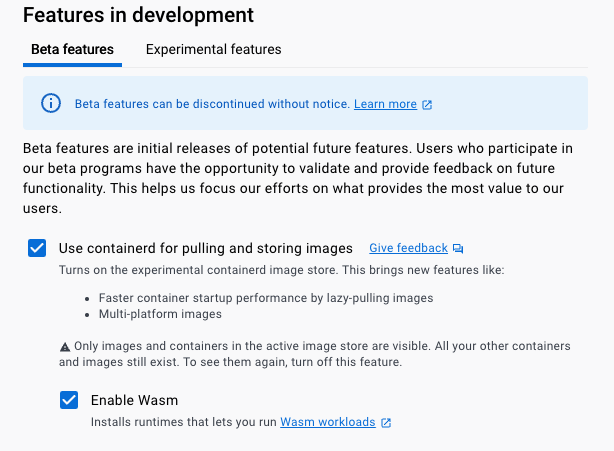
Make sure Docker Desktop has `containerd` and `Wasm` enabled. Go to Settings =>
Features in development:
* Check: `Use containerd for pulling and storing images`
* Check: `Enable Wasm`
### Run the Wasm module in Docker
We’re now ready to wrap the Wasm module into an OCI image.
Create a [Dockerfile](https://github.com/meteatamel/wasm-basics/blob/main/samples/rust-wasm-docker/hello-wasm/Dockerfile):
```Dockerfile
FROM scratch
COPY ./target/wasm32-wasi/debug/hello-wasm.wasm /hello-wasm.wasm
ENTRYPOINT [ "/hello-wasm.wasm" ]
```
Note, it is based on `scratch` (i.e. empty) image but this is not a problem, the Wasm module is self-contained.
Build the image:
```sh
docker build -t meteatamel/hello-wasm:0.1 .
```
Run the image locally in Docker with `wasmedge`:
```sh
docker run --runtime=io.containerd.wasmedge.v1 meteatamel/hello-wasm:0.1
Hello, Wasm before!
Hello, Wasm after!
```
Or with `wasmtime`:
```sh
docker run --runtime=io.containerd.wasmtime.v1 meteatamel/hello-wasm:0.1
Hello, Wasm before!
Hello, Wasm after!
```
As it’s running, you can see that it’s just a regular container:
```sh
docker ps
CONTAINER ID IMAGE COMMAND CREATED STATUS PORTS NAMES
1d2e3f09a9c5 meteatamel/hello-wasm:0.1 "hello-wasm.wasm"
```
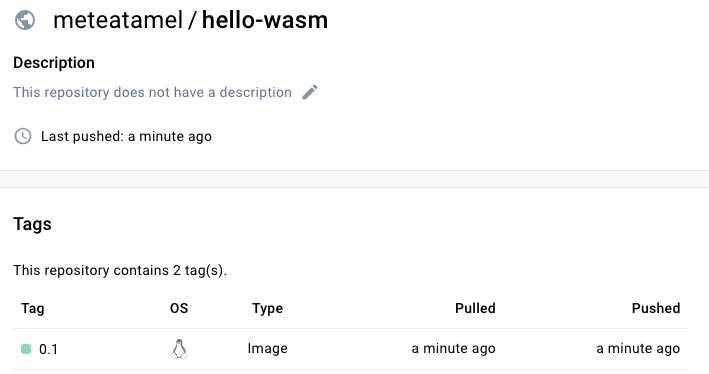
You can push the image to Docker Hub as usual:
```sh
docker image push meteatamel/hello-wasm:0.1
```
---
In this blog post, I explained how Docker recently announced experimental
support for running Wasm modules. I also showed how to run a Wasm module in
Docker using the `wasmedge` runtime..
Feel free to check out my previous blog posts and GitHub repo on Wasm and reach
out to me on Twitter @[meteatamel](https://twitter.com/meteatamel) for
questions:
* [Exploring WebAssembly outside the browser](https://atamel.dev/posts/2023/06-20_explore_wasm_outside_browser/)
* [Compile Rust & Go to a Wasm+Wasi module and run in a Wasm runtime](https://atamel.dev/posts/2023/06-26_compile_rust_go_wasm_wasi/)
* https://github.com/meteatamel/wasm-basics