# Adding HTTP around Wasm with Wagi
Author: [Mete Atamel](https://atamel.dev/) | Published: 2023-07-18 | Topics: Wasm, Serverless, How To | Canonical: https://atamel.dev/posts/2023/07-18_add_http_around_wasm_with_wagi/
In my previous posts, I talked about how you can [run WebAssembly (Wasm) outside
the browser with Wasi
](https://atamel.dev/posts/2023/06-20_explore_wasm_outside_browser/)and [run it
in a Docker container with
runwasi](https://atamel.dev/posts/2023/06-29_run_wasm_in_docker/). The
[Wasi](https://wasi.dev/) specification allows Wasm modules access to things
like the filesystem and environment variables (and I showed how in [this blog
post](https://atamel.dev/posts/2023/06-26_compile_rust_go_wasm_wasi/)) but
networking and threading are not implemented yet. This is severely limiting if
you want to run HTTP based microservices on Wasm for example.
There are projects like [Wagi](https://github.com/deislabs/wagi) and more
recently [Wasix](https://wasix.org/) that try to add some networking support
around Wasi modules (and frameworks like [Spin](https://github.com/fermyon/spin)
that use Wagi under the covers). In this post, let’s deep dive into Wagi and see
how it helps to add HTTP support around your Wasm+Wasi modules.
### WebAssembly Gateway Interface (Wagi)
[Wagi](https://github.com/deislabs/wagi) is an implementation of the
well-established CGI spec ([RFC
3875](https://datatracker.ietf.org/doc/html/rfc3875)) for Wasm+Wasi modules and
it allows you to map HTTP paths to Wasm modules.
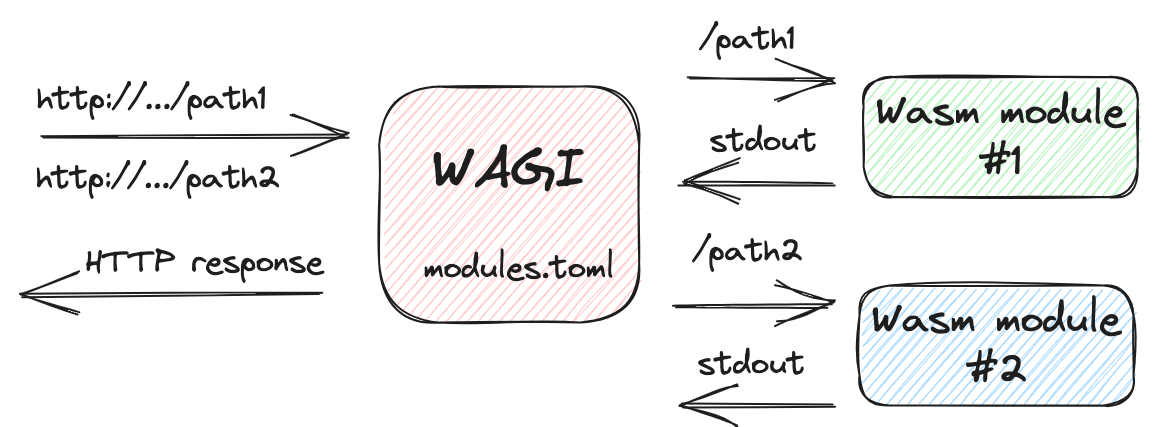
In Wagi, you write a command line application that prints a few headers required
by the spec and compile it to Wasm+Wasi. Then, you add an entry to a
`modules.toml` file matching a URL path to the Wasm module. Wagi takes care of
routing HTTP requests in and out of your Wasm module. The important point is
that the Wasm module does not need network access while using Wagi.
Headers are placed in environment variables. Query parameters, when present, are
sent in as command line options. Incoming HTTP payloads are sent in via STDIN
and the response is simply written to STDOUT.
Let’s walk through an example of running Wasm+Wasi modules as HTTP handlers
using Wagi.
### Install Wagi
To start, we need to install Wagi.
1. Go to the [Wagi releases page](https://github.com/deislabs/wagi/releases) on
GitHub.
2. Download the latest release package suitable for your system. For example, if
you are using macOS on an AMD64 machine, download
[wagi-v0.8.1-macos-amd64.tar.gz](wagi-v0.8.1-macos-amd64.tar.gz).
3. Extract and move the Wagi binary:
```bash
tar -zxf wagi-v0.8.1-macos-amd64.tar.gz
sudo mv ./wagi /usr/local/bin/wagi
```
Wagi is now installed on your system.
### Create a .NET Wasm module
For the first Wasm module, let’s create a simple .NET console application.
Open your terminal and create a new .NET console application:
```sh
dotnet new console -n HelloWagi
```
Add `Wasi.Sdk` package so we can compile the app to Wasm:
```sh
cd HelloWagi
dotnet add package Wasi.Sdk --prerelease
```
Change
[Program.cs](https://github.com/meteatamel/wasm-basics/blob/main/samples/hello-wagi/HelloWagi/Program.cs)
to the following:
```csharp
Console.WriteLine("Content-Type: text/plain");
Console.WriteLine("Status: 200");
Console.WriteLine();
Console.WriteLine("Hello WAGI from C#!");
// Headers are placed in environment variables
var envVars = Environment.GetEnvironmentVariables();
Console.WriteLine($"### Environment variables: {envVars.Keys.Count} ###");
foreach (var variable in envVars.Keys)
{
Console.WriteLine($"{variable} = {envVars[variable]}");
}
```
It’s a simple console application that prints content type and status headers.
It also prints environment variables to show how HTTP headers are passed in as
environment variables.
Build to Wasm:
```sh
dotnet build
HelloWagi -> /Users/atamel/dev/github/meteatamel/wasm-basics/samples/hello-wagi/HelloWagi/bin/Debug/net8.0/HelloWagi.wasm
```
The .NET app is ready for Wagi.
### Create a Go Wasm module
For the second application, let’s use Go. Create a
[hello-wagi.go](https://github.com/meteatamel/wasm-basics/blob/main/samples/hello-wagi/hello-wagi.go)
file to print the following:
```go
package main
import (
"fmt"
"io/ioutil"
"os"
)
func main() {
fmt.Println("Content-Type: text/plain")
fmt.Println("Status: 200")
fmt.Println()
fmt.Println("Hello WAGI from Go!")
// Headers are placed in environment variables
envVars := os.Environ()
fmt.Printf("### Environment variables: %d ###\n", len(envVars))
for _, envVar := range envVars {
fmt.Println(envVar)
}
// Query parameters are sent in as command line options
args := os.Args[1:]
fmt.Printf("### Query parameters: %d ###\n", len(args))
for _, arg := range args {
fmt.Printf("Argument=%s\n", arg)
}
// Incoming HTTP payloads are sent in via STDIN
fmt.Println("### HTTP payload ###")
payload, err := ioutil.ReadAll(os.Stdin)
if err != nil {
fmt.Println("Error reading payload:", err)
return
}
fmt.Println(string(payload))
}
```
Notice how the Go app is again printing the content type and status headers. It also prints environment variables, command line options and STDIN to show how headers, query parameters, and incoming HTTP payloads are passed in via Wagi.
Build to Wasm:
```sh
tinygo build -target=wasi hello-wagi.go
```
We’re now ready to run these two Wasm modules with Wagi.
### Run as HTTP handlers with Wagi
To run these Wasm modules as HTTP handlers with Wagi, create a
[modules.toml](https://github.com/meteatamel/wasm-basics/blob/main/samples/hello-wagi/modules.toml)
file that maps paths to Wasm modules:
```yaml
[[module]]
route = "/csharp"
module = "HelloWagi/bin/Debug/net8.0/HelloWagi.wasm"
[[module]]
route = "/go"
module = "hello-wagi.wasm"
```
Run as a Wagi module:
```sh
wagi -c modules.toml
Ready: serving on http://127.0.0.1:3000
```
In a separate terminal, you can use `curl` to reach different paths that invoke the right module:
```sh
curl http://localhost:3000/csharp
Hello WAGI from C#!
### Environment variables: 23 ###
SERVER_PORT = 3000
REQUEST_METHOD = GET
X_MATCHED_ROUTE = /csharp
...
curl -X POST http://127.0.0.1:3000/go\?arg1=value1 -d 'Hello World'
Hello WAGI from Go!
### Environment variables: 24 ###
HTTP_CONTENT_LENGTH=11
X_RAW_PATH_INFO=
REMOTE_USER=
PATH_INFO=
PATH_TRANSLATED=
HTTP_USER_AGENT=curl/7.88.1
SCRIPT_NAME=/go
...
### Query parameters: 1 ###
Argument=arg1=value1
### HTTP payload ###
Hello World
```
---
As Wasi catches up with networking and threading support, Wagi provides a way to
map HTTP paths to Wasm modules without networking support in the Wasm module.
I should also mention that [Wasix](https://wasix.org/) recently burst onto the
scene, positioning itself as the superset of Wasi. It shows great potential for
full threading and networking support for Wasm applications but it’s only
supported on Wasmer runtime right now and the language support is very limited.
Wasix is probably a topic for another future blog post. Until then, feel free to
check out my previous blog posts and GitHub repo on Wasm and reach out to me on
Twitter @[meteatamel](https://twitter.com/meteatamel) for feedback and
questions:
* [Exploring WebAssembly outside the browser](https://atamel.dev/posts/2023/06-20_explore_wasm_outside_browser/)
* [Compile Rust & Go to a Wasm+Wasi module and run in a Wasm runtime](https://atamel.dev/posts/2023/06-26_compile_rust_go_wasm_wasi/)
* [Running Wasm in a container](https://atamel.dev/posts/2023/06-29_run_wasm_in_docker/)
* https://github.com/meteatamel/wasm-basics