# Test and change an existing web app with Duet AI
Author: [Mete Atamel](https://atamel.dev/) | Published: 2024-01-29 | Topics: GenAI, DuetAI, Google Cloud Platform | Canonical: https://atamel.dev/posts/2024/01-29_duetai_test_change_existing_webapp/

In the [Create and deploy a new web app to Cloud Run with Duet AI](https://atamel.dev/posts/2024/01-23_duetai_create_deploy_webapp_clourun/) post,
I created a simple web application and deployed to Cloud Run using [Duet
AI](https://cloud.google.com/duet-ai)'s help. Duet AI has been great to get a new
and simple app up and running. But does it help for existing apps? Let's figure
it out.
In this blog post, I take an existing web app, explore it,
test it, add a unit test, add new functionality, and add more unit tests all
with the help of Duet AI. Again, I captured some lessons learned along the way to
get the most out of Duet AI.
## Before you start
I’m using Duet AI with Cloud Code in Visual Studio Code but you can use Duet AI
from other IDEs supported by Cloud Code such as IntelliJ. You can also use it in
the Cloud Shell Editor or Cloud Workstations from Google
Cloud Console. Check out [Duet AI for
Developers](https://cloud.google.com/duet-ai/docs/discover/developers) page for
more details on how to get setup with Duet AI.
## Todo list app
For the application, I went through the [Tutorial: Create a web API with ASP.NET
Core](https://learn.microsoft.com/en-us/aspnet/core/tutorials/first-web-api?view=aspnetcore-8.0&WT.mc_id=dotnet-35129-website&tabs=visual-studio-code)
to create a Todo list app with MVC architecture and a web API.

Or, you can start with the finished tutorial app in
[before](https://github.com/meteatamel/duetai-aspnet-webapi/tree/main/before/TodoApi)
folder in my GitHub repo.
Check that you can run the application:
```sh
cd before/TodoApi
dotnet run
```
You should see the app running:
```sh
Building...
info: Microsoft.Hosting.Lifetime[14]
Now listening on: http://localhost:5112
info: Microsoft.Hosting.Lifetime[0]
Application started. Press Ctrl+C to shut down.
```
You can also interact with the app with Swagger/OpenAPI endpoint at
`http://localhost:5112/swagger/`:

We're ready to use Duet AI's help.
## Explain code with Duet AI
First, let's see if Duet AI can help us to understand the code.
Open [TodoItemsController.cs](https://github.com/meteatamel/duetai-aspnet-webapi/blob/main/before/TodoApi/Controllers/TodoItemsController.cs)
in your IDE and ask the following to Duet AI using the Duet AI chat functionality:
**Prompt**
> Can you explain what this class does?
**Answer**
> The TodoItemsController class is a RESTful API controller that provides CRUD operations for the TodoItem entity. The controller inherits from the ControllerBase class, which provides a number of common methods for handling HTTP requests.
> The GetTodoItems() method returns a list of all TodoItems in the database. The GetTodoItem() method returns a single TodoItem by its id. The PutTodoItem() method updates a TodoItem in the database. The PostTodoItem() method creates a new TodoItem in the database. The DeleteTodoItem() method deletes a TodoItem from the database.
> The controller also implements the IActionFilter interface, which allows it to perform custom actions before and after each request. In this case, the controller uses the IActionFilter interface to validate the input parameters for each request and to ensure that the user is authenticated.
> The TodoItemsController class is a good example of how to create a RESTful API using ASP.NET Core. The controller is well-organized and easy to use, and it provides a number of features that make it a good choice for building APIs.
That was a pretty good explanation and gave me a good overview of the code!
## Test code with Duet AI
Next, let's see if Duet AI can help us to test the code.
Highlight the [PostTodoItem()](https://github.com/meteatamel/duetai-aspnet-webapi/blob/main/before/TodoApi/Controllers/TodoItemsController.cs#L73) method in `TodoItemsController.cs`:
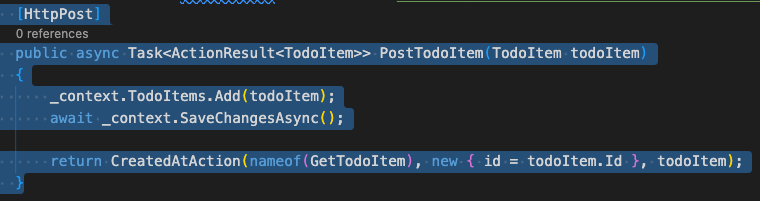
Ask the following:
**Prompt**
> Can you help me test this highlighted code with curl? The server is running on port 5112
**Answer**
> Sure. To test the highlighted code with curl, you can use the following command:
```sh
curl -X POST \
-H "Content-Type: application/json" \
-d '{
"name": "Learn ASP.NET Core",
"description": "Build a web API with ASP.NET Core",
"priority": 4,
"done": false
}' \
http://localhost:5112/api/TodoItems
```
> This command will send a POST request to the api/TodoItems endpoint on the server, with the body of the request containing the JSON representation of a new TodoItem object. The server will then create the new TodoItem and return a response with the status code 201 Created.
> You can then use the curl command to get the newly created TodoItem by using the following command:
```sh
curl http://localhost:5112/api/TodoItems/1
```
> This command will send a GET request to the api/TodoItems/1 endpoint on the server, and the server will return a response with the status code 200 OK and the body of the response containing the JSON representation of the newly created TodoItem.
As you can see, the command works but it isn’t correct. `ToDoItem.cs` contains
`id`, `name`, and `isComplete` fields. Duet AI got the name correctly but the
rest was not correct.
Let's try a more specific prompt.
**Prompt**
> Can you try generating the curl command, taking `ToDoItem.cs` into account?
**Answer**
> Sure. The following command will send a POST request to the api/TodoItems endpoint on the server, with the body of the request containing the JSON representation of a new TodoItem object:
```sh
curl -X POST \
-H "Content-Type: application/json" \
-d '{
"name": "Learn ASP.NET Core",
"isComplete": false
}' \
http://localhost:5112/api/TodoItems
```
> This command will create a new TodoItem with the name "Learn ASP.NET Core" and the value of IsComplete set to false.
This time the answer was correct! Duet AI needs good context to provide good answers.
## Add unit tests with Duet AI
Next, let's see if Duet AI can help us to add unit tests.
First, let's refresh our memories about the unit test frameworks in C#.
**Prompt**
> What unit testing frameworks exist for ASP.NET apps?
**Answer**
> There are a number of unit testing frameworks available for ASP.NET apps. Some of the most popular include:
> xUnit: xUnit is a free and open source unit testing framework for .NET. It is based on the xUnit unit testing framework for Java. xUnit is a popular choice for ASP.NET apps because it is easy to use and has a large community of users and contributors.
> NUnit: NUnit is a free and open source unit testing framework for .NET. It is based on the JUnit unit testing framework for Java. NUnit is a popular choice for ASP.NET apps because it is powerful and has a large community of users and contributors.
> MSTest: MSTest is a built-in unit testing framework for Visual Studio. It is a good choice for ASP.NET apps because it is easy to use and integrates well with Visual Studio.
> In addition to these three frameworks, there are a number of other unit testing frameworks available for ASP.NET apps. Some of these include FluentAssertions, Shouldly, and AssertJ.
> The best unit testing framework for your ASP.NET app will depend on your specific needs and preferences. If you are new to unit testing, xUnit or NUnit are a good place to start. If you are more experienced with unit testing, MSTest or one of the other more powerful frameworks may be a better choice.
This is a pretty good answer! I remember using xUnit before, so let's continue
with more specific xUnit questions.
***Prompt***
> How can I create a new xUnit project for unit tests for `TodoItemsController.cs` from the command line? I want the project in `ToDoApiTest` folder
**Answer**
> To create a new xUnit project for unit tests for` TodoItemsController.cs `from the command line, you can use the following steps:
> * Open a terminal window.
> * Navigate to the ToDoApiTest folder.
> * Run the following command:
```sh
dotnet new xunit
```
> This will create a new xUnit project with the name UnitTest1.
> Open the` UnitTest1.csproj` file in a text editor. Add the following code to the file:
```csharp
using TodoApi.Controllers;
using Xunit;
namespace TodoApi.Tests;
public class TodoItemsControllerTests
{
[Fact]
public void GetTodoItems_ShouldReturnAllTodoItems()
{
// Arrange
var controller = new TodoItemsController();
// Act
var result = controller.GetTodoItems();
// Assert
Assert.Equal(3, result.Count());
}
}
```
This answer is pretty good for generating a new test project but it has some issues:
1. Duet AI is telling us to add code to the project file, `UnitTest1.csproj` instead
of `UnitTest1.cs`. You an go ahead and rename `UnitTest1.cs` to `ToDoItemsControllerTests.cs` and add the suggested code.
2. `ToDoItemsController` is another project, so we need to refer to the other project from the test project.
Here comes another question to Duet AI:
**Prompt**
> How can I change the project file `ToDoApiTest.csproj` to refer to the `TodoItemsController` class in the other project `ToDoApi.csproj`?
**Answer**
> To change the project file `ToDoApiTest.csproj` to refer to the
> `TodoItemsController` class in the other project ToDoApi.csproj, you can use
> the following steps: [1]
> * Open the ToDoApiTest.csproj file in a text editor.
> * Find the line that references the TodoItemsController class.
> * Change the path to the TodoItemsController class to the path in the ToDoApi.csproj file.
> * Save the ToDoApiTest.csproj file.
> * Here is an example of how you would change the project file ToDoApiTest.csproj
> to refer to the TodoItemsController class in the other project ToDoApi.csproj:
>
```csharp
net6.0
enable
```
While the answer is not perfect (`Controller Include` is not needed),
it gives you what you need, just copy the `ProjectReference Include` to your testing
project (see [TodoApiTest.csproj](https://github.com/meteatamel/duetai-aspnet-webapi/blob/main/after/TodoApiTest/TodoApiTest.csproj))
Now, the generated testing code is still not compiling:

We need a mocked DB context for the controller.
**Prompt**
> How can I have a mocked `TodoContext` for xunit testing?
**Answer**
> To have a mocked `TodoContext` for xunit testing, you can use the following steps:
>
> * Create a new class that inherits from the TodoContext class.
> * In the new class, override the OnConfiguring method and provide a fake connection string.
> * In the new class, override the OnModelCreating method and provide a fake model builder.
> * Create a new instance of the new class and use it in your xunit tests.
> * Here is an example of how you would create a mocked TodoContext for xunit testing:
```csharp
using Microsoft.EntityFrameworkCore;
using TodoApi.Models;
public class MockedTodoContext : TodoContext
{
public MockedTodoContext()
: base(new DbContextOptionsBuilder()
.UseInMemoryDatabase("TodoApi")
.Options)
{
}
protected override void OnConfiguring(DbContextOptionsBuilder optionsBuilder)
{
optionsBuilder.UseInMemoryDatabase("TodoApi");
}
protected override void OnModelCreating(ModelBuilder modelBuilder)
{
modelBuilder.Entity().ToTable("TodoItems");
}
}
```
The answer is pretty good and actually works! You can now go back to the
[TodoItemsControllerTests.cs](https://github.com/meteatamel/duetai-aspnet-webapi/blob/main/after/TodoApiTest/TodoItemsControllerTests.cs)
and change it to have the basic unit test:
```csharp
[Fact]
public void GetTodoItems_ShouldNotReturnNull()
{
// Arrange
var controller = new TodoItemsController(new MockedTodoContext());
// Act
var result = controller.GetTodoItems();
// Assert
Assert.NotNull(result);
}
```
We got our unit test project setup with our first unit test done! As you
observed, we had to nudge Duet AI with the right context to get a good answer.
It's important to not expect perfection from Duet AI or GenAI in general.
## Add new functionality with Duet AI
Now that we have basics in place, let's use Duet AI to add a new endpoint to
check in an item exists or not.
**Prompt**
> Can you modify `TodoItemsController.cs` to add a method to check if a `ToDoItem`
> exists? The method should handle the HTTP HEAD method and it should use the id
> of ToDoItem to check for existence
**Answer**
```csharp
using Microsoft.AspNetCore.Mvc;
using Microsoft.EntityFrameworkCore;
using TodoApi.Models;
namespace TodoApi.Controllers
{
[Route("api/[controller]")]
[ApiController]
public class TodoItemsController : ControllerBase
{
...
// HEAD: api/TodoItems/5
[HttpHead("{id}")]
public async Task HeadTodoItem(long id)
{
var todoItem = await _context.TodoItems.FindAsync(id);
if (todoItem == null)
{
return NotFound();
}
return NoContent();
}
}
}
```
The answer is very good and compiles out of the box!
You can test by adding an item:
```sh
curl -X POST \
-H "Content-Type: application/json" \
-d '{
"name": "Learn ASP.NET Core",
"isComplete": false
}' \
http://localhost:5112/api/TodoItems
{"id":1,"name":"Learn ASP.NET Core","isComplete":false}%
```
Verify that the new endpoint works:
```sh
curl -I -X HEAD http://localhost:5112/api/ToDoItems/1
HTTP/1.1 204 No Content
Date: Mon, 15 Jan 2024 13:42:24 GMT
Server: Kestrel
```
Duet AI inline code generation seems to work pretty well, presumably, Duet AI
has good context when it's generating code.
## Add more unit tests to test new functionality with Duet AI
Let's see if Duet AI can generate us some unit tests for the new functionality.
**Prompt**
> Can you add a new unit test in `TodoItemsControllerTests.cs` to test the `HeadTodoItem` method in `TodoItemsController.cs`?
**Answer**
```csharp
using Microsoft.AspNetCore.Mvc;
using Microsoft.EntityFrameworkCore;
using System.Threading.Tasks;
using TodoApi.Controllers;
using TodoApi.Models;
using Xunit;
namespace TodoApi.Tests;
public class TodoItemsControllerTests
{
[Fact]
public async Task HeadTodoItem_ReturnsNoContent_WhenItemExists()
{
// Arrange
var options = new DbContextOptionsBuilder()
.UseInMemoryDatabase(databaseName: "TodoItems")
.Options;
var context = new TodoContext(options);
var controller = new TodoItemsController(context);
var id = 1;
// Act
var result = await controller.HeadTodoItem(id);
// Assert
Assert.IsType(result);
}
[Fact]
public async Task HeadTodoItem_ReturnsNotFound_WhenItemDoesNotExist()
{
// Arrange
var options = new DbContextOptionsBuilder()
.UseInMemoryDatabase(databaseName: "TodoItems")
.Options;
var context = new TodoContext(options);
var controller = new TodoItemsController(context);
var id = 1;
// Act
var result = await controller.HeadTodoItem(id);
// Assert
Assert.IsType(result);
}
}
```
The good news is that both tests compile fine! The first test actually fails but
the second test works. The reason why the first test fails is that the in-memory
database does not have any items really, so I asked Duet AI to refine the test.
**Prompt**
> `HeadTodoItem_ReturnsNoContent_WhenItemExists` method does not work because
> the item is not in the list. Can you change the code to make sure the item
> actually exists?
**Answer**
> Sure. Here is the updated code for the HeadTodoItem_ReturnsNoContent_WhenItemExists method:
```csharp
[Fact]
public async Task HeadTodoItem_ReturnsNoContent_WhenItemExists()
{
// Arrange
var options = new DbContextOptionsBuilder()
.UseInMemoryDatabase(databaseName: "TodoItems")
.Options;
var context = new TodoContext(options);
var controller = new TodoItemsController(context);
var todoItem = new TodoItem { Id = 1, Name = "Item 1", IsComplete = false };
context.TodoItems.Add(todoItem);
await context.SaveChangesAsync();
var id = 1;
// Act
var result = await controller.HeadTodoItem(id);
// Assert
Assert.IsType(result);
}
```
That’s perfect!
The only thing you need to change is to make sure the second test refers to a
non-existent item. You can check the final tests
[TodoItemsControllerTests.cs](https://github.com/meteatamel/duetai-aspnet-webapi/blob/main/after/TodoApiTest/TodoItemsControllerTests.cs):
Duet AI has been very useful in adding new functionality and adding unit tests
for it!
## Lessons learned
Let’s recap some lessons learned as I played with different prompts:
* **Direct Duet AI with your knowledge**. You need to direct Duet AI
to the right answer with your knowledge of the code. E.g. Don't say "Test the
highlighted code with curl" but instead say "Test the highlighted code taking
`ToDoItem.cs` into account".
* **Be specific**. The more specific you get, the better will be the answers.
E.g. Don’t say "How can I test?" but rather say "How can I create a `xUnit`
project to unit test `TodoItemsController.cs` class from command line"
* **Don't expect perfection**. Duet AI will tell you to generate code in wrong
files sometimes or generate unnecessary configuration. You need to know your
way around in your project to know what's needed where, rather than expecting
perfect answers that you can copy/paste.
* The generated tests are good starting points. They won’t be perfect but will
save a lot of time. You then need to nudge Duet AI to generate the right tests for
what you want to exactly test.
* Inline code/test generation seems to pretty good in Duet AI, presumably, due to Duet
AI having good context with existing code and files in your project.
---
In this blog post, I took an existing web app, explored it,
tested it, added unit tests and added new functionality with the help of Duet
AI. With specific prompts, right context, and some nudging, it gives good
answers and overall, it saved me a lot of time and effort.
As always, if you have any questions or feedback, feel free to reach out to me
on Twitter @[meteatamel](https://twitter.com/meteatamel).