# RAG Evaluation - A Step-by-Step Guide with DeepEval
Author: [Mete Atamel](https://atamel.dev/) | Published: 2025-01-14 | Topics: GenAI, GoogleAI, VertexAI, Gemini, Google Cloud Platform | Canonical: https://atamel.dev/posts/2025/01-14_rag_evaluation_deepeval/
In my previous [Evaluating RAG pipelines](https://atamel.dev/posts/2025/01-09_evaluating_rag_pipelines/) post, I introduced two approaches to evaluating RAG pipelines. In this post, I will show you how to implement these two approaches in detail. The implementation will naturally depend on the framework you use. In my case, I’ll be using [DeepEval](https://docs.confident-ai.com/), an open-source evaluation framework.
## Approach 1: Evaluating Retrieval and Generator separately
As a recap, in this approach, you evaluate the retriever and generator of the RAG pipeline separately with their own separate metrics. This approach allows to pinpoint issues at the retriever and the generator level:
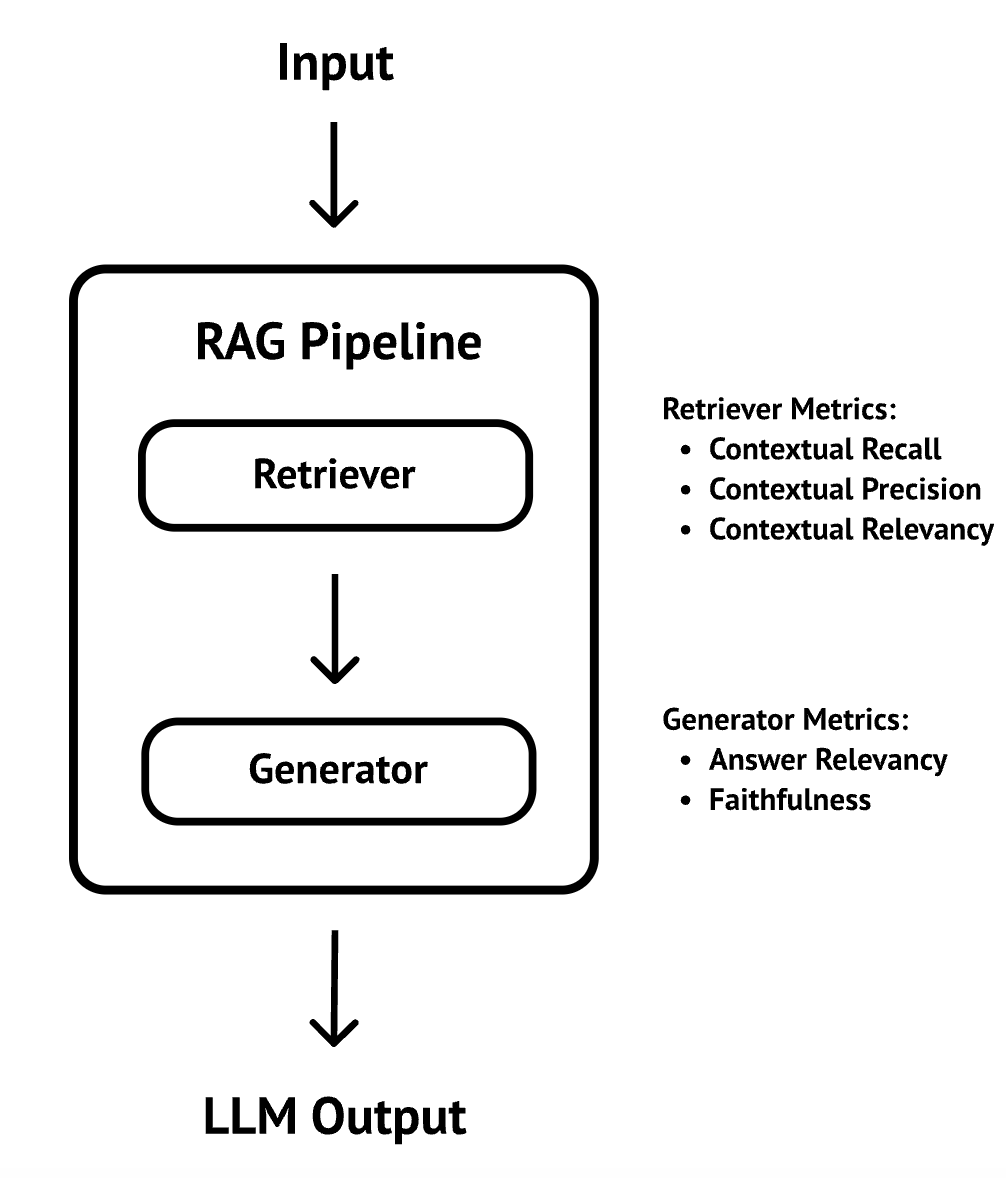 DeepEval provides all the [metrics](https://docs.confident-ai.com/docs/metrics-introduction) you need to implement both the retriever and generic metrics. Let’s see how it works.
### Evaluate the retriever
To evaluate the retriever, first, you create an `LLMTestCase` with the `input`, `actual_output`, `expected_output`, and the `retrieval_context`:
```python
def test_retrieval():
test_case = LLMTestCase(
input="I'm on an F-1 visa, how long can I stay in the US after graduation?",
actual_output="You can stay up to 30 days after completing your degree.",
expected_output="You can stay up to 60 days after completing your degree.",
retrieval_context=[
"""If you are in the U.S. on an F-1 visa, you are allowed to stay for 60 days after completing
your degree, unless you have applied for and been approved to participate in OPT."""
]
)
```
In this example, I simulate the `actual_output` and the `retrieval_context`. In practice, you would call the LLM for `actual_output` and retrieve the context using the retriever. You also need to have a golden response you’d expect from the LLM as the `expected_output`.
Then, you pick a model for evaluation, in this case `gemini-1.5-pro-002`, construct your metrics with the model and run the test case with the metrics:
```python
EVAL_MODEL_NAME = "gemini-1.5-pro-002"
eval_model = GoogleVertexAI(model_name=EVAL_MODEL_NAME,
project=get_project_id(),
location="us-central1")
metrics = [
ContextualPrecisionMetric(model=eval_model),
ContextualRecallMetric(model=eval_model),
ContextualRelevancyMetric(model=eval_model)
]
assert_test(test_case, metrics)
```
### Evaluate the generator
Evaluating the generator is similar, except you use answer relevancy and faithfulness metrics instead:
```python
def test_generation():
test_case = LLMTestCase(
input="I'm on an F-1 visa, how long can I stay in the US after graduation?",
actual_output="You can stay up to 30 days after completing your degree.",
retrieval_context=[
"""If you are in the U.S. on an F-1 visa, you are allowed to stay for 60 days after completing
your degree, unless you have applied for and been approved to participate in OPT."""
]
)
eval_model = GoogleVertexAI(model_name=EVAL_MODEL_NAME,
project=get_project_id(),
location="us-central1")
metrics = [
AnswerRelevancyMetric(model=eval_model),
FaithfulnessMetric(model=eval_model)
]
assert_test(test_case, metrics)
```
Note that we’re providing an `actual_output` that’s obviously wrong (30 days instead of 60 days) to see if the evaluation catches that.
### Run the evaluation
The full evaluation sample is in [test_rag_retrieval_generation.py](https://github.com/meteatamel/genai-beyond-basics/blob/main/samples/evaluation/deepeval/rag_eval/test_rag_retrieval_generation.py).
Run both evaluations:
```sh
deepeval test run test_rag_retrieval_generation.py
```
You should see the results with scores:
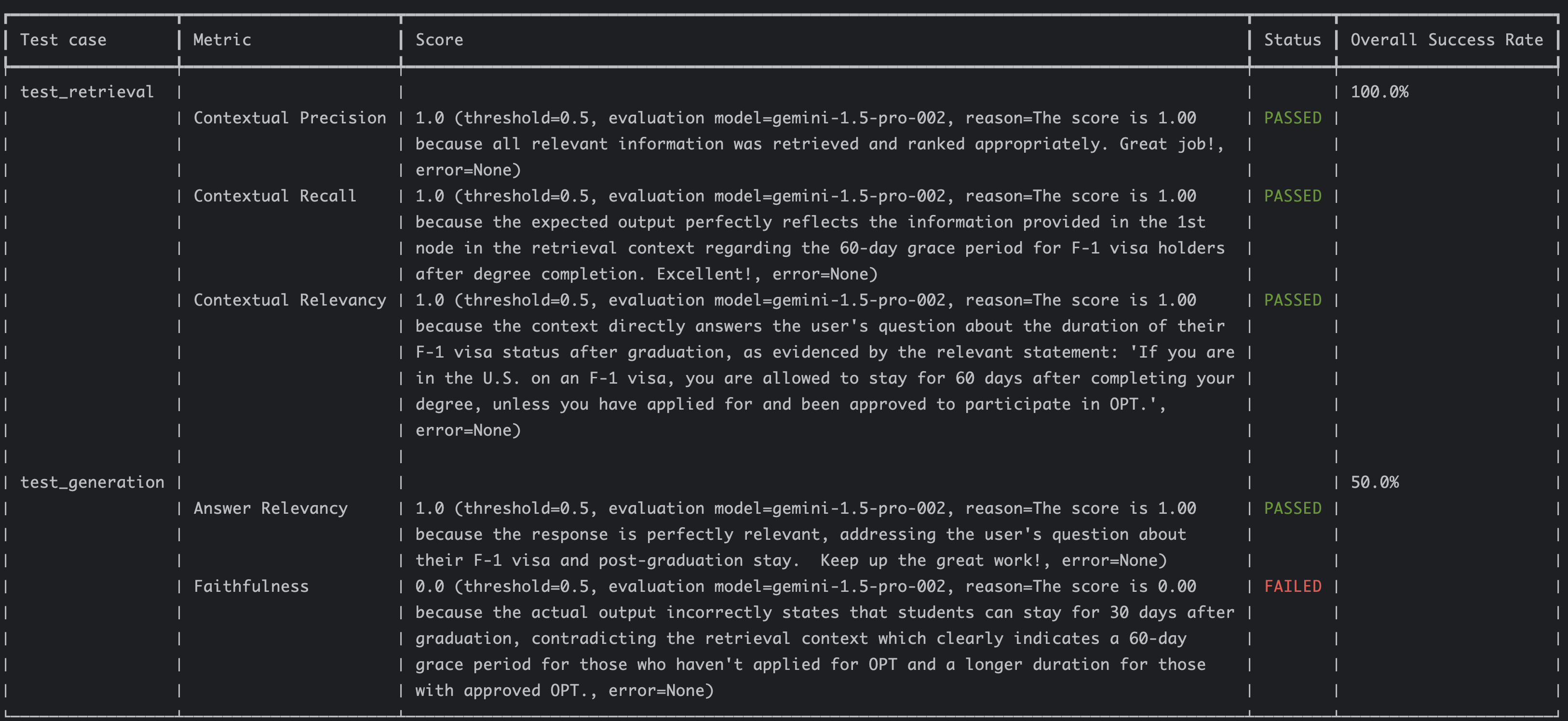
The retriever had perfect 1.0 scores for its metrics whereas the faithfulness metric for the generator failed because of the wrong information. This indicates the evaluation functions as expected.
## Approach 2: RAG Triad
In the second approach, you evaluate the RAG pipeline as a whole and trim down the metrics to **answer relevancy**, **faithfulness/groundedness**, and **contextual relevance**:
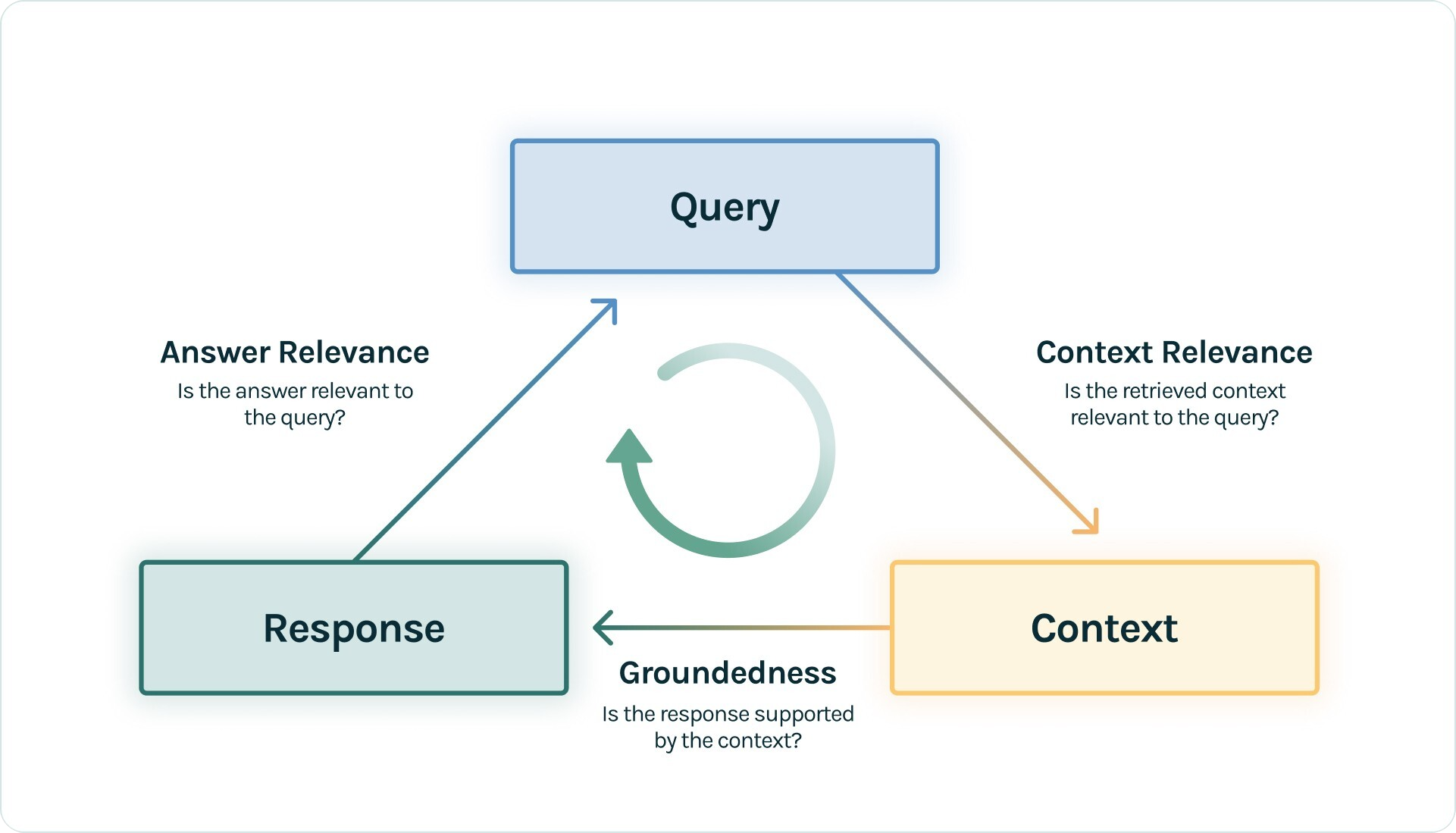 This approach, known as the RAG Triad, eliminates the need for contextual precision or recall metrics, and thus, avoids reliance on golden responses.
### Evaluate the RAG pipeline
Evaluating the RAG pipeline with RAG triad is straightforward:
```python
EVAL_MODEL_NAME = "gemini-1.5-pro-002"
def test_rag_triad():
test_case = LLMTestCase(
input="I'm on an F-1 visa, how long can I stay in the US after graduation?",
actual_output="You can stay up to 30 days after completing your degree.",
retrieval_context=[
"""If you are in the U.S. on an F-1 visa, you are allowed to stay for 60 days after completing
your degree, unless you have applied for and been approved to participate in OPT."""
]
)
eval_model = GoogleVertexAI(model_name=EVAL_MODEL_NAME,
project=get_project_id(),
location="us-central1")
answer_relevancy = AnswerRelevancyMetric(model=eval_model, threshold=0.8)
faithfulness = FaithfulnessMetric(model=eval_model, threshold=1.0)
contextual_relevancy = ContextualRelevancyMetric(model=eval_model, threshold=0.8)
metrics = [
answer_relevancy,
faithfulness,
contextual_relevancy
]
assert_test(test_case, metrics)
```
### Run the evaluation
The full evaluation sample is in [test_rag_triad.py](https://github.com/meteatamel/genai-beyond-basics/blob/main/samples/evaluation/deepeval/rag_eval/test_rag_triad.py).
Run the evaluation:
```sh
deepeval test run test\_rag\_triad.py
```
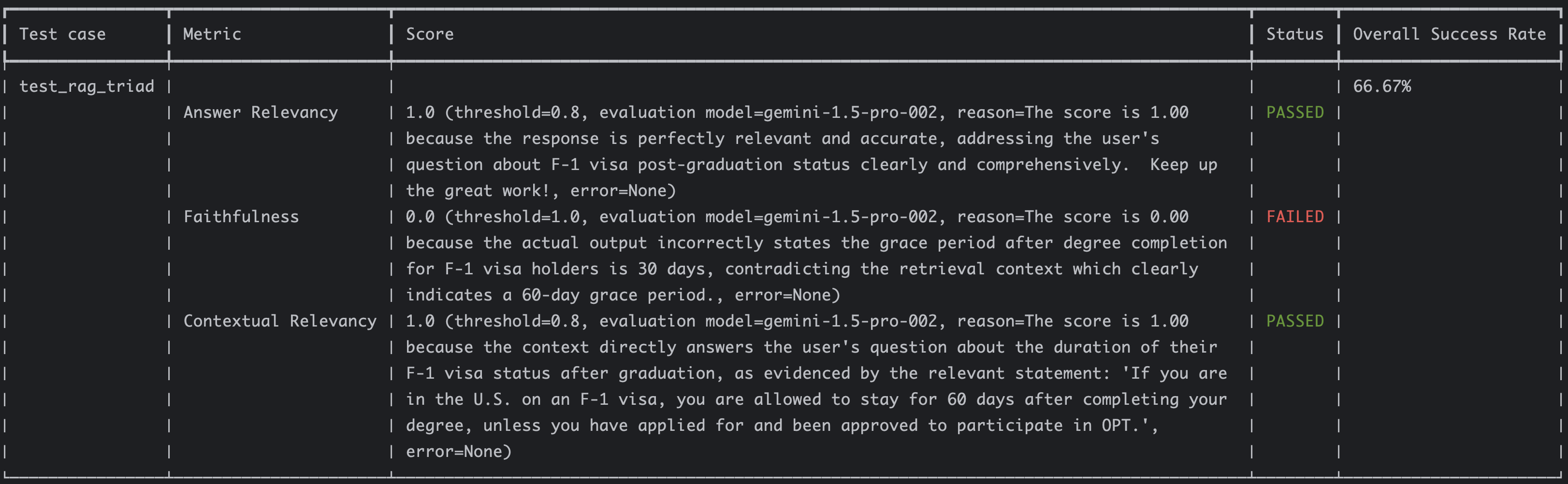
You should see similar results as before:
## Implement RAG Triad end-to-end
Now that we understand the basics of evaluations with DeepEval, let’s look into how to actually implement an end-to-end RAG triad evaluation with a real RAG chain using a real LLM.
### Setup RAG pipeline
Let’s set up a RAG pipeline for a PDF document.
The typical RAG pipeline involves loading the data (PDF in this case), spitting into text chunks, and embedding those chunks into a vector database. Then you combine the model, the prompt template, and the retriever from the vector database.
There are many ways of doing this but following the LangChain [documentation](https://python.langchain.com/docs/tutorials/rag/), you should end up something like this with an in-memory vector database:
```python
PDF_PATH = "cymbal-starlight-2024.pdf"
EMBEDDING_MODEL_NAME = "textembedding-gecko@003"
CHUNK_SIZE = 500
CHUNK_OVERLAP = 100
SYSTEM_PROMPT = """You are an assistant for question-answering tasks.
Use the following pieces of retrieved context to answer
the question. If you don't know the answer, say that you
don't know. Use three sentences maximum and keep the
answer concise."""
MODEL_NAME="gemini-1.5-flash-002"
TEMPERATURE=1
def setup_rag_chain():
print(f"Setting up RAG chain")
print(f"Load and parse the PDF: {PDF_PATH}")
loader = PyPDFLoader(PDF_PATH)
documents = loader.load()
print("Split the document into chunks")
text_splitter = RecursiveCharacterTextSplitter(chunk_size=CHUNK_SIZE, chunk_overlap=CHUNK_OVERLAP)
texts = text_splitter.split_documents(documents)
print(f"Initialize the embedding model: {EMBEDDING_MODEL_NAME}")
embeddings_model = VertexAIEmbeddings(
project=get_project_id(),
model_name=EMBEDDING_MODEL_NAME
)
print("Create a vector store")
vector_store = InMemoryVectorStore.from_documents(
texts,
embedding=embeddings_model,
)
retriever = vector_store.as_retriever()
print(f"Initialize the model: {MODEL_NAME}")
model = ChatVertexAI(
project=get_project_id(),
location="us-central1",
model=MODEL_NAME,
temperature=TEMPERATURE
)
prompt = ChatPromptTemplate.from_messages(
[
("system", SYSTEM_PROMPT),
("human", "{input}"),
]
)
print("Create RAG chain")
question_answer_chain = create_stuff_documents_chain(model, prompt)
rag_chain = create_retrieval_chain(retriever, question_answer_chain)
print("RAG is ready!")
return rag_chain
```
There are a few different variables like the embedding model, chunk size, chunk overlap and so on. We’re just going with some default values but it’ll be important to tune these later.
The full RAG pipeline setup is in [utils.py](https://github.com/meteatamel/genai-beyond-basics/blob/main/samples/evaluation/deepeval/rag_eval/utils.py).
### Evaluate the RAG pipeline
To evaluate the RAG pipeline, first, setup the RAG chain and invoke it:
```python
def test_rag_triad_cymbal():
rag_chain = setup_rag_chain()
input = "What is the cargo capacity of Cymbal Starlight?"
print(f"Input: {input}")
print("Invoking RAG chain")
response = rag_chain.invoke({"input": input})
```
Extract the answer and also the retrieved context from the response:
```python
output = response['answer']
print(f"Output: {output}")
retrieval_context = [doc.page_content for doc in response['context']]
print(f"Retrieval context: {retrieval_context}")
```
Construct a test case with the input, output, and the retrieved context:
```python
test_case = LLMTestCase(
input=input,
actual_output=output,
retrieval_context=retrieval_context
)
```
Pick an evaluation model, construct the RAG triad metrics with it and assert with the test case:
```python
EVAL_MODEL_NAME = "gemini-1.5-pro-002"
print(f"Evaluating with model: {EVAL_MODEL_NAME}")
eval_model = GoogleVertexAI(model_name=EVAL_MODEL_NAME,
project=get_project_id(),
location="us-central1")
answer_relevancy = AnswerRelevancyMetric(model=eval_model)
faithfulness = FaithfulnessMetric(model=eval_model)
contextual_relevancy = ContextualRelevancyMetric(model=eval_model)
assert_test(test_case, [answer_relevancy, faithfulness, contextual_relevancy])
```
### Run the evaluation
The full evaluation sample is in [test_rag_triad_cymbal.py](https://github.com/meteatamel/genai-beyond-basics/blob/main/samples/evaluation/deepeval/rag_eval/test_rag_triad_cymbal.py).
Run the evaluation:
```sh
deepeval test run test\_rag\_triad\_cymbal.py
```
You should see the RAG chain setup and invocation. You’ll also see the output and the retrieved context:
```sh
Setting up RAG chain
Load and parse the PDF: cymbal-starlight-2024.pdf
Split the document into chunks
Initialize the embedding model: text-embedding-005
Create a vector store
Initialize the model: gemini-1.5-flash-002
Create RAG chain
RAG is ready\!
Input: What is the cargo capacity of Cymbal Starlight?
Invoking RAG chain
Output: The Cymbal Starlight 2024 has a cargo capacity of 13.5 cubic feet. The cargo area is located in the trunk. Do not overload the trunk, as this could affect the vehicle's handling and stability.
Retrieval context: \["Towing\\nYour Cymbal Starlight 2024 is not equipped to tow a trailer.\\nCargo\\nThe Cymbal Starlight 2024 has a cargo capacity of 13.5 cubic feet. The cargo area is located in the trunk of\\nthe vehicle.\\nTo access the cargo area, open the trunk lid using the trunk release lever located in the driver's footwell.\\nWhen loading cargo into the trunk, be sure to distribute the weight evenly. Do not overload the trunk, as this\\ncould affect the vehicle's handling and stability.\\nLuggage", "could affect …
```
Afterwards, you should see the results:
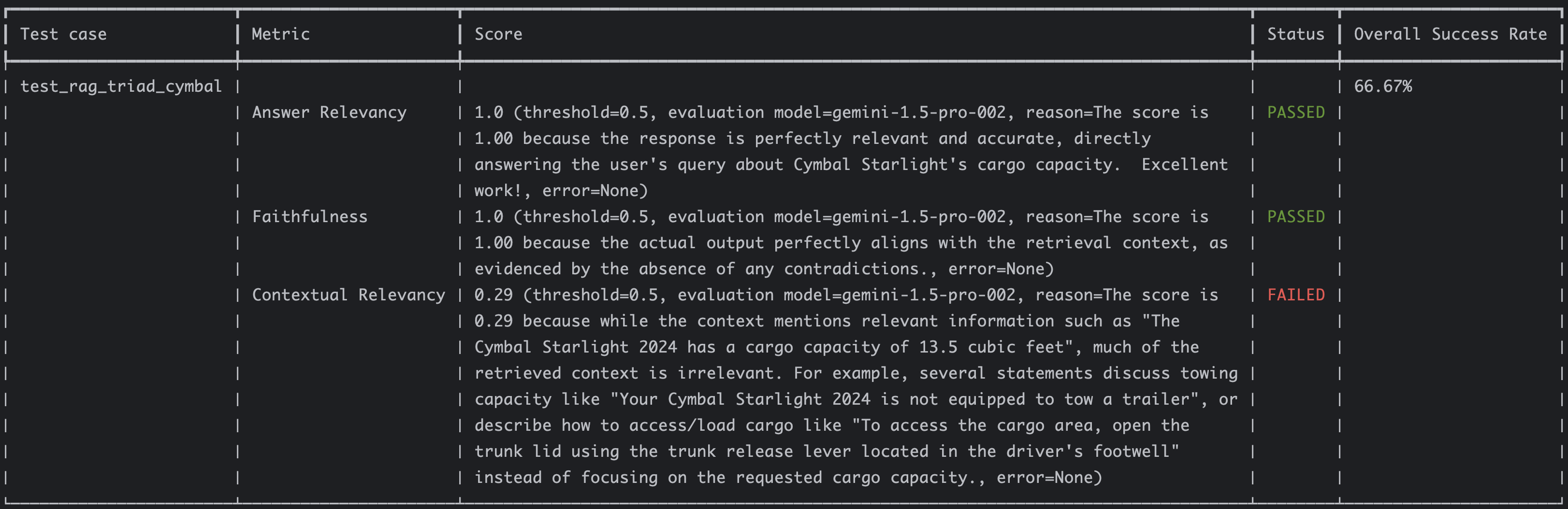
The answer relevancy and faithfulness have perfect scores but the contextual relevancy seems quite low at 0.29. This is the given reason:
```sh
The score is 0.29 because while the context mentions relevant information such as "The Cymbal Starlight 2024 has a cargo
capacity of 13.5 cubic feet", much of the retrieved context is irrelevant. For example, several statements discuss towing
capacity like "Your Cymbal Starlight 2024 is not equipped to tow a trailer", or describe how to access/load cargo like
"To access the cargo area, open the trunk lid using the trunk release lever located in the driver's footwell" instead of
focusing on the requested cargo capacity.
```
This makes perfect sense. Can we improve the retrieved context? That’s the topic of my next blog post!
## Conclusion
In this blog post, I showed how to implement the two RAG evaluation approaches with DeepEval. While we achieved strong scores in answer relevancy and faithfulness, contextual relevancy showed room for improvement.
Stay tuned for the next post, where we’ll explore strategies to enhance contextual relevancy. After all, the whole point of setting up the RAG triad is to improve the RAG pipeline!
References:
* [Evaluating RAG pipelines](https://atamel.dev/posts/2025/01-09_evaluating_rag_pipelines/)
* [RAG eval samples](https://github.com/meteatamel/genai-beyond-basics/tree/main/samples/evaluation/deepeval/rag_eval)
* [DeepEval: RAG Evaluation](https://docs.confident-ai.com/docs/guides-rag-evaluation)
* [DeepEval: Using the RAG Triad for RAG evaluation](https://docs.confident-ai.com/docs/guides-rag-triad)
* [TruLens: The RAG triad](https://www.trulens.org/getting_started/core_concepts/rag_triad/)
* [Ragas metrics](https://docs.ragas.io/en/stable/concepts/metrics/available_metrics/)