# Gen AI Evaluation Service - Multimodal Metrics
Author: [Mete Atamel](https://atamel.dev/) | Published: 2025-08-05 | Topics: GenAI, VertexAI, Gemini, Google Cloud Platform | Canonical: https://atamel.dev/posts/2025/08-05_genai_eval_service_multimodal_metrics/
This is the sixth and final post in my **Vertex AI Gen AI Evaluation Service blog post series.** In the previous posts,
we covered computation-based, model-based, tool-use, and agent metrics. These metrics measure different aspects of an LLM
response in different ways but one thing they all had in common: they are all for **text-based outputs**.
LLMs nowadays also produce multimodal (images, videos) outputs. **How do you evaluate multimodal outputs?** That’s the topic
of this blog post.
## Gecko
The Gen AI evaluation service supports image and video output evaluation with [Gecko](https://arxiv.org/abs/2404.16820).
Based on a [published paper]((https://arxiv.org/abs/2404.16820)) and announced in [Evaluate your gen media models with multimodal evaluation on Vertex AI](https://cloud.google.com/blog/products/ai-machine-learning/evaluate-your-gen-media-models-on-vertex-ai) blog post, Gecko is a rubric-based and interpretable autorater designed to assess the performance of image and video generation models.
In essence, Gecko works as follows:
1. Takes the media generation prompt and identifies the semantic elements (entities, their attributes, and their
relationships) that need to be verified in the generated media.
2. Generates a list of questions to verify these semantic elements.
3. Scores each question against the generated media and gets an overall evaluation score.
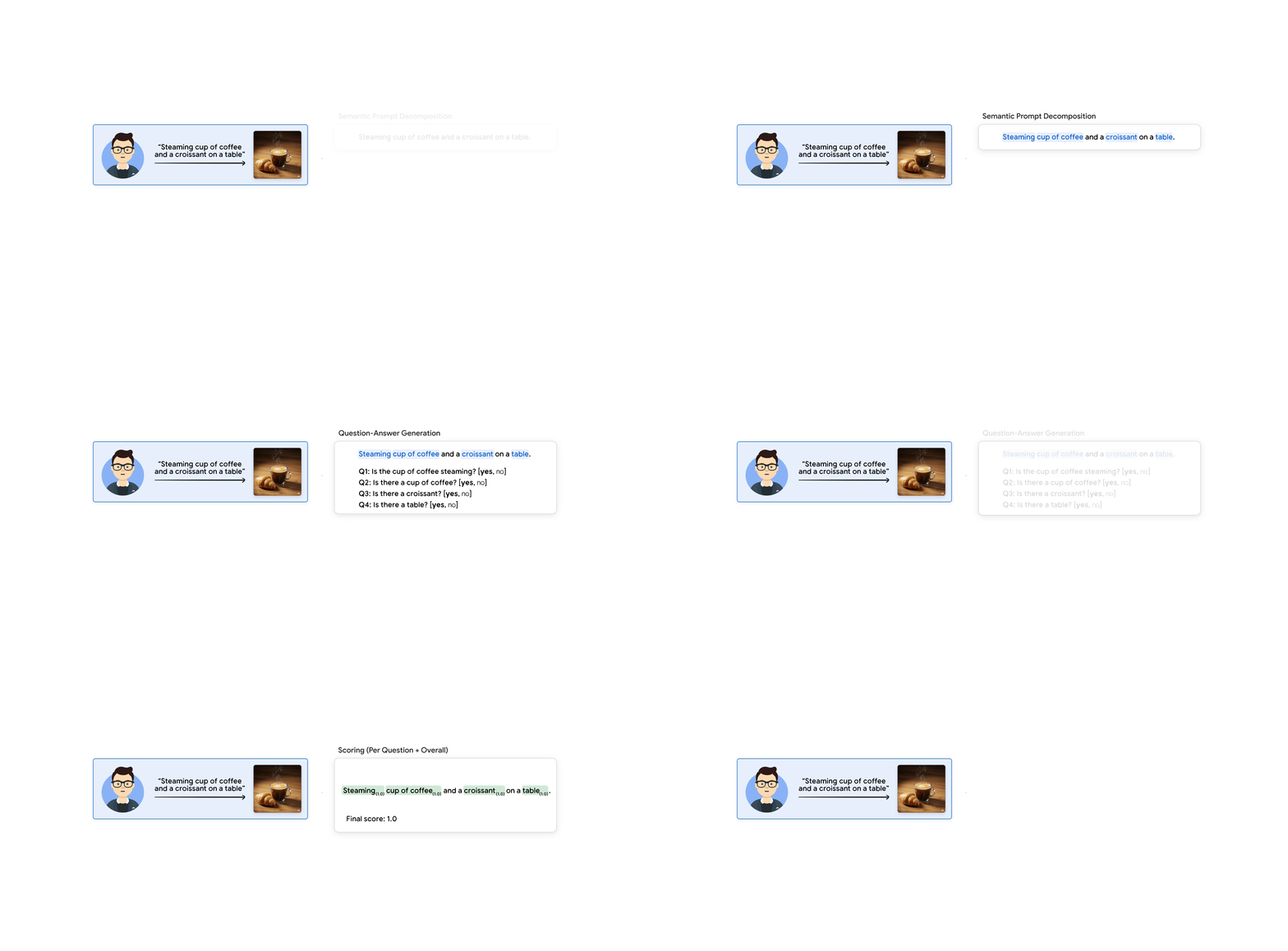
To give a concrete example, let’s assume you have the following prompt to generate an image.
**Prompt**: Steaming cup of coffee and a croissant on a table
The model first extracts the semantic elements from the prompt:
**Keywords**: {Steaming} {cup of coffee} and a {croissant} on a {table}
Then, it generates a list of questions and answers to probe the generated image or video for the presence and accuracy
of the extracted elements and relationships.
**Questions and answers:**

**Scoring:** The model scores each question individually, and they are then
aggregated to produce a final evaluation score:

You can read [Evaluate your gen media models with multimodal evaluation on Vertex
AI](https://cloud.google.com/blog/products/ai-machine-learning/evaluate-your-gen-media-models-on-vertex-ai?e=48754805&utm_campaign=CDR_0xe875a906_default&utm_medium=external&utm_source=blog)
blog post for more details.
Let’s now look at some samples.
## Custom parsing logic
First of all, the outputs supported by Gecko are more sophisticated than the default outputs of predefined rubric-based
metrics. To handle this, custom parsing logic is required.
See
[utils.py](https://github.com/meteatamel/genai-beyond-basics/blob/main/samples/evaluation/vertexai_genai_eval/multimodal/utils.py)
for details on how `QARecord` and `QAResult` classes are parsed.
## Image evaluation
For image evaluation, you first need a rubric generation prompt:
```python
RUBRIC_GENERATION_PROMPT = """
In this task, you will help me measure generate question-answer pairs to verify
an image description.
You will first identify the key words to be validated, e.g. ignoring filler or
redundant words.
You will then, for each word, generate a question-answer pair for each word. The
question should be simple and *cannot* be answered correctly based on common
sense or without reading the description. You will also tag each question as
having a type, which should be one off: object,
human, animal, food, activity, attribute, counting, color, material, spatial,
location, shape, other.
**Important**: There should be one and only one question-answer pair per key word.
Given a "description", your answer must have this format:
{
"keywords": "Your {1}[itemized] {2}[keywords]",
"qas": [
The list of QAs in the format "{
"question_id": i,
"question": "the question",
"answer": "the answer: yes or no",
"choices": ["yes", "no"],
"justification": "why is this about the keyword",
"question_type": "the question type. One of [object, human, animal, food, activity, attribute, counting, color, material, spatial, location, shape, other]."
}".,
]
}
```
You will provide some examples for the model in the prompt:
```python
Description: A man posing for a selfie in a jacket and bow tie.
Answer:
{
"keywords": "A {1}[man] {2}[posing] for a {3}[selfie] in a {4}[jacket] and a {5}[bow tie].",
"qas": [
{
"question_id": 1, "question": "is there a man in the image?", "answer": "yes", "choices": ["yes", "no"],
"justification": "There is a man in the image.", "question_type": "human"
},
{
"question_id": 2, "question": "is the man posing for a selfie?", "answer": "yes", "choices": ["yes", "no"],
"justification": "The man is posing for a selfie.", "question_type": "activity"
},
{
"question_id": 3, "question": "Is the man taking a selfie?", "answer": "yes", "choices": ["yes", "no"],
"justification": "This is a selfie.", "question_type": "object"
},
{
"question_id": 4, "question": "Is the man wearing a jacket?", "answer": "yes", "choices": ["yes", "no"],
"justification": "The man is wearing a jacket.", "question_type": "object"
},
{
"question_id": 5, "question": "Is the man wearing a bow tie?", "answer": "yes", "choices": ["yes", "no"],
"justification": "The man is wearing a bow tie.", "question_type": "object"
},
]
}
```
You also need a rubric validation prompt:
```python
RUBRIC_VALIDATOR_PROMPT = """
# Instructions
Look at the image carefully and answer each question with a yes or no:
{rubrics}
# Image
{image}
# Output Format
Question: repeat the original question
Verdict: yes|no
"""
```
See [prompt_templates_image.py](https://github.com/meteatamel/genai-beyond-basics/blob/main/samples/evaluation/vertexai_genai_eval/multimodal/prompt_templates_image.py).
Now, let’s say you have the following two image generation prompts:
```python
prompts = [
"steaming cup of coffee and a croissant on a table",
"steaming cup of coffee and toast in a cafe",
```
Let’s see how these prompts are evaluated against the same image:
```python
images = [
'{"contents": [{"parts": [{"file_data": {"mime_type": "image/png", "file_uri": "gs://cloud-samples-data/generative-ai/evaluation/images/coffee.png"}}]}]}',
'{"contents": [{"parts": [{"file_data": {"mime_type": "image/png", "file_uri": "gs://cloud-samples-data/generative-ai/evaluation/images/coffee.png"}}]}]}',
```

It’s a matter of setting up rubric generation and validation and creating a rubric metric:
```python
eval_dataset = pd.DataFrame(
{
"prompt": prompts,
"image": images,
}
)
# Rubric Generation
rubric_generation_config = RubricGenerationConfig(
prompt_template=prompt_templates.RUBRIC_GENERATION_PROMPT,
parsing_fn=utils.parse_json_to_qa_records,
)
# Rubric Validation
gecko_metric = PointwiseMetric(
metric="gecko_metric",
metric_prompt_template=prompt_templates.RUBRIC_VALIDATOR_PROMPT,
custom_output_config=CustomOutputConfig(
return_raw_output=True,
parsing_fn=utils.parse_rubric_results,
),
)
# Rubric Metric
rubric_based_gecko = RubricBasedMetric(
generation_config=rubric_generation_config,
critique_metric=gecko_metric,
)
# Generate rubrics for user prompts
dataset_with_rubrics = rubric_based_gecko.generate_rubrics(eval_dataset)
# Evaluate with rubrics
eval_task = EvalTask(
dataset=dataset_with_rubrics,
metrics=[rubric_based_gecko],
experiment=get_experiment_name(__file__)
)
eval_result = eval_task.evaluate(response_column_name="image")
```
Run the evaluation:
```bash
python gecko_image.py
==Metrics table==
prompt \
0 steaming cup of coffee and a croissant on a table
1 steaming cup of coffee and toast in a cafe
image \
0 {"contents": [{"parts": [{"file_data": {"mime_type": "image/png", "file_uri": "gs://cloud-samples-data/generative-ai/evaluation/images/coffee.png"}}]}]}
1 {"contents": [{"parts": [{"file_data": {"mime_type": "image/png", "file_uri": "gs://cloud-samples-data/generative-ai/evaluation/images/coffee.png"}}]}]}
rubrics \
0 is the cup of coffee steaming?yes,no\nis there a cup of coffee?yes,no\nis there a croissant?yes,no\nis the cup of coffee and croissant on a table?yes,no
1 is the cup of coffee steaming?yes,no\nis there a cup of coffee?yes,no\nis there toast?yes,no\nis this scene in a cafe?yes,no
keywords \
0 {1}[steaming] {2}[cup of coffee] and a {3}[croissant] on a {4}[table]
1 {1}[steaming] {2}[cup of coffee] and {3}[toast] in a {4}[cafe]
qa_records \
0 [QARecord(question='is the cup of coffee steaming?', question_type='attribute', gt_answer='yes', answer_choices=['yes', 'no'], justification='The cup of coffee is steaming.'), QARecord(question='is there a cup of coffee?', question_type='food', gt_answer='yes', answer_choices=['yes', 'no'], justification='There is a cup of coffee.'), QARecord(question='is there a croissant?', question_type='food', gt_answer='yes', answer_choices=['yes', 'no'], justification='There is a croissant.'), QARecord(question='is the cup of coffee and croissant on a table?', question_type='object', gt_answer='yes', answer_choices=['yes', 'no'], justification='The cup of coffee and croissant is on a table.')]
1 [QARecord(question='is the cup of coffee steaming?', question_type='attribute', gt_answer='yes', answer_choices=['yes', 'no'], justification='The cup of coffee is steaming.'), QARecord(question='is there a cup of coffee?', question_type='food', gt_answer='yes', answer_choices=['yes', 'no'], justification='There is a cup of coffee.'), QARecord(question='is there toast?', question_type='food', gt_answer='yes', answer_choices=['yes', 'no'], justification='There is toast.'), QARecord(question='is this scene in a cafe?', question_type='location', gt_answer='yes', answer_choices=['yes', 'no'], justification='This scene is in a cafe.')]
gecko_metric/rubric_results
0 {'is the cup of coffee steaming?': 'yes', 'is there a cup of coffee?': 'yes', 'is there a croissant?': 'yes', 'is the cup of coffee and croissant on a table?': 'yes'}
1 {'is the cup of coffee steaming?': 'yes', 'is there a cup of coffee?': 'yes', 'is there toast?': 'no', 'is this scene in a cafe?': 'no'}
final_score: [1.0, 0.5]
mean final_score: 0.75
```
As you can see, the first prompt got the perfect score, but the second prompt got 0.5 because the image doesn’t contain
a toast, nor is the scene recognizable as a cafe.
It looks like the image evaluation is working nicely! [gecko_image.py](https://github.com/meteatamel/genai-beyond-basics/blob/main/samples/evaluation/vertexai_genai_eval/multimodal/gecko_image.py) has all the details.
## Video evaluation
The video evaluation is very similar to the image evaluation except the prompt is modified slightly. Instead of
generating yes/no questions, the prompt generates multiple-choice questions:
```python
Given a "description", your answer must respond using this format:
{
"keywords": "Your {1}[itemized] {2}[keywords]",
"qas": [
The list of QAs in the format "{
"question_id": i,
"question": "the question",
"choices": ["a) option 1", "b) option 2", "c) option 3", "d) option 4"],
"justification": "why is this about the keyword",
"answer": "the identifier of the right answer (i.e. a, b, c, or d)",
}",
]
}
```
See
[prompt_templates_video.py](https://github.com/meteatamel/genai-beyond-basics/blob/main/samples/evaluation/vertexai_genai_eval/multimodal/prompt_templates_video.py)
and [gecko_video.py](https://github.com/meteatamel/genai-beyond-basics/blob/main/samples/evaluation/vertexai_genai_eval/multimodal/gecko_video.py)
for the evaluation code.
## Conclusion
In this post, we covered Gecko for image and video output evaluation. This concludes our six-part blog post series on
Gen AI Evaluation Service where we covered various metrics, their strengths, and weaknesses. As usual, feel free to reach
out [@meteatamel](https://x.com/meteatamel), if you have questions or comments.
References:
* [Part 1: Gen AI Evaluation Service - An Overview](https://atamel.dev/posts/2025/06-30_genai_eval_service_overview/)
* [Part 2: Gen AI Evaluation Service - Computation-Based
Metrics](https://atamel.dev/posts/2025/07-02_genai_eval_service_comp_metrics/)
* [Part 3: Gen AI Evaluation Service - Model-Based
Metrics](https://atamel.dev/posts/2025/07-08_genai_eval_service_model_metrics/)
* [Part 4: Gen AI Evaluation Service - Tool-Use
Metrics](https://atamel.dev/posts/2025/07-28_genai_eval_service_tool_metrics/)
* [Part 5: Gen AI Evaluation Service - Agent
Metrics](https://atamel.dev/posts/2025/08-01_genai_eval_service_agent_metrics/)
* [Tutorial: Gen AI evaluation service - multimodal metrics
(Gecko)](https://github.com/meteatamel/genai-beyond-basics/blob/main/samples/evaluation/vertexai_genai_eval/multimodal)
* [Evaluate your gen media models with multimodal evaluation on Vertex
AI](https://cloud.google.com/blog/products/ai-machine-learning/evaluate-your-gen-media-models-on-vertex-ai)
* [Documentation: Gen AI evaluation service
overview](https://cloud.google.com/vertex-ai/generative-ai/docs/models/evaluation-overview?utm_campaign=CDR_0xe875a906_default&utm_medium=external&utm_source=blog)
* [Notebooks: GenAI evaluation service
samples](https://github.com/GoogleCloudPlatform/generative-ai/tree/main/gemini/evaluation)