# Where does Antigravity look for Plugins?
Author: [Mete Atamel](https://atamel.dev/) | Published: 2026-08-18 | Updated: 2026-08-21 | Topics: GenAI, Agents, AGY | Canonical: https://atamel.dev/posts/2026/08-18_where_agy_plugins/
> [!note] Note
> This post blog is part of a series, see [Summary : Where does Antigravity look for configurations?]()
I've been exploring how to configure and extend Antigravity (AGY).
In today's post, I'll explore **Plugins**, yet another way of configuring AGY.
We'll also explore **Build with Google** plugins and the differences between AGY
plugins and Agent plugins.
## Plugins
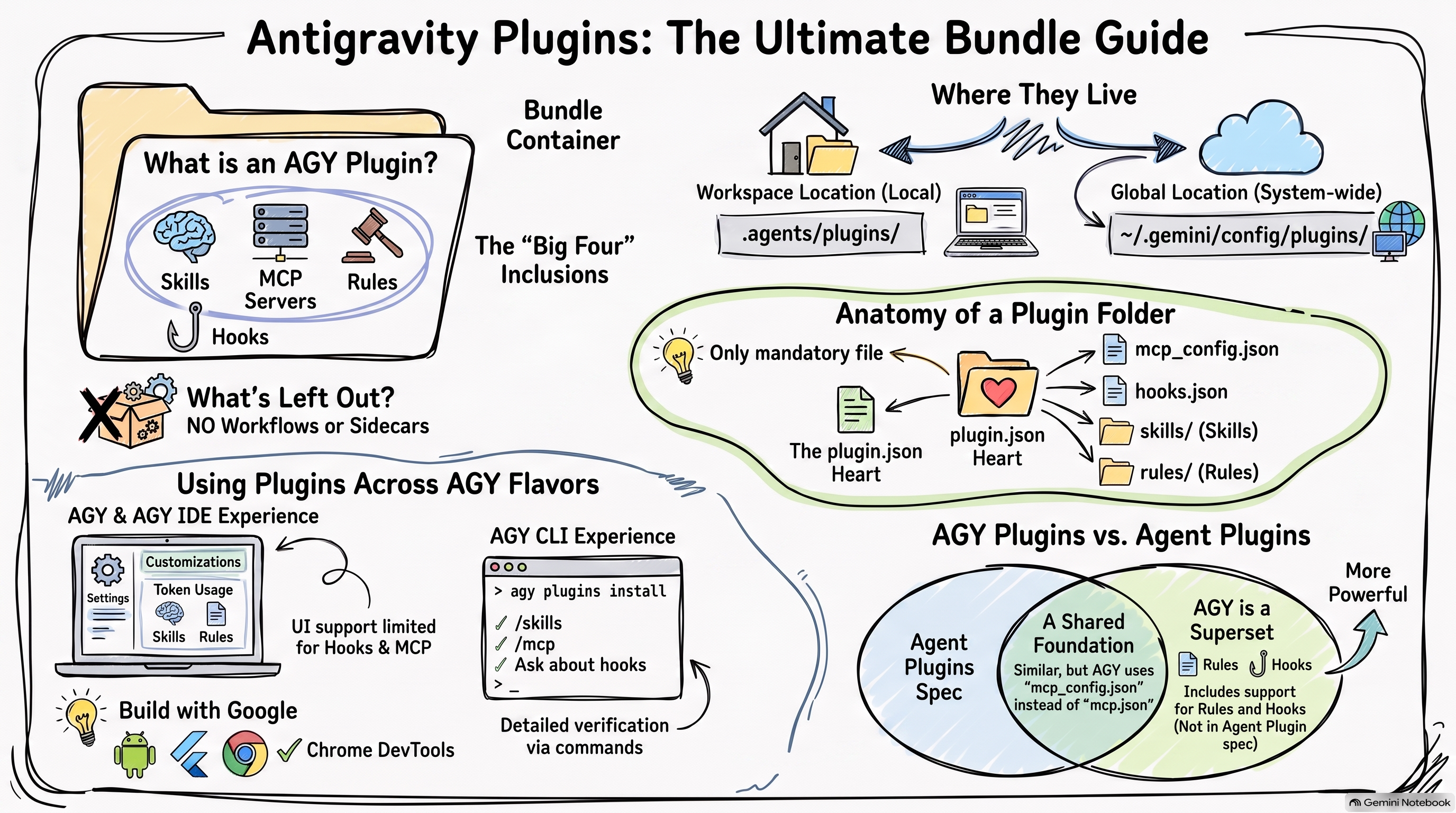
[Plugins](https://antigravity.google/docs/plugins/) in AGY are a way to package
and group **Agents, **Skills**, **MCP Servers**, **Rules**, and **Hooks**
together. This can be useful when you want to distribute and install a
collection of these configuration options in one go. It's also another way of
configuring and extending AGY.
A few things to note about AGY plugins:
* Plugins are not a new configuration option per se. They're just a way to
package existing configuration options together.
* Plugins do **NOT** support Workflows or Sidecars.
* AGY Plugins is currently a superset of [Agent
Plugins](https://developers.googleblog.com/agent-plugins-package-your-skills-tools-and-more/).
We'll cover this later.
## Configuration
Plugins can be applied globally or per workspace and are currently saved to the
following locations for all 3 flavours: AGY, AGY CLI, and AGY IDE.
- Workspace: `.agents/plugins/`
- Global: `~/.gemini/config/plugins/`
Under the `plugins` folder, you define each plugin with its own configuration:
```text
plugins/
├── /
│ ├── agents/ # Optional agents
│ ├── hooks.json # Optional hooks
│ ├── mcp_config.json # Optional MCP servers
│ ├── plugin.json # Required plugin file
│ ├── rules/ # Optional rules
│ │ └── .md
│ └── skills/ # Optional skills
│ └── /
│ └── SKILL.md
└── /
└── plugin.json # Required plugin file
```
The only mandatory file is `plugin.json` and it can be as simple as the following:
```json
{
"name": "my-plugin"
}
```
## Sample Plugin
Let's now create a sample plugin and see how it works.
I create my dummy plugin in the `metes-plugin` folder and it includes 1 skill, 1 MCP
server, 1 rule, and 1 hook:
```
metes-plugin/
├── agents/
│ ├── hello-world-agent.md
├── hooks.json
├── mcp_config.json
├── plugin.json
├── rules/
│ ├── mete-rule.md
├── scripts/
│ └── log_hook_event.py
└── skills/
└── mete-skill/
└── SKILL.md
```
The `plugin.json` defines the plugin:
```json
{
"name": "mete-plugin",
"version": "0.0.1",
"description": "A test plugin.",
"author": {
"name": "Mete Atamel"
},
"license": "Apache-2.0"
}
```
The agent is just a dummy agent for testing purposes:
```markdown
---
name: hello-world-agent
description: This is just a Hello World agent
---
```
The skill defined under `mete-skill` is just a dummy skill for testing purposes:
```text
---
name: mete-skill
description: |
This is a dummy skill for testing purposes. It does not provide any useful functionality.
---
# Mete Skill
A dummy skill for testing purposes. It does not provide any useful functionality.
```
The rule defined under `rules` is also for testing purposes:
```text
---
trigger: always_on
---
This is a dummy rule
```
The `mcp_config.json` is equally simple pointing to the Cloud Run MCP server:
```json
{
"mcpServers": {
"cloudrun": {
"command": "npx",
"args": [
"-y",
"@google-cloud/cloud-run-mcp"
]
}
}
}
```
The `hooks.json` and `scripts/log_hook_event.py` are from my previous [Where
does Antigravity look for Hooks?]() blog
post that simply logs received hook events.
## Support in AGY, AGY CLI, and AGY IDE
Once you define a plugin in the files and folders I mentioned above,
all 3 flavours of AGY will recognize it. However, the UI support is patchy and
slightly different in each.
Let's take a look.
### AGY and AGY IDE
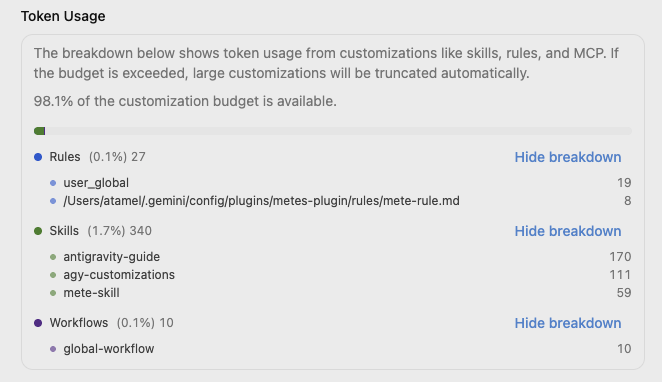
In both AGY and AGY IDE, under `Settings` → `Customizations` → `Token Usage`
you can see the rules, skills, and agents coming from plugins:
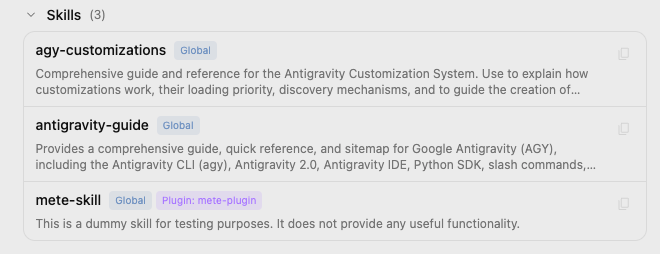
Under `Skills` section of the same page, you'll see the skill coming from the plugin:
Under `Custom Agents` section, you'll see the agent coming from the plugin:

However, you won't see the rule under `Rules` section and the MCP server under
`MCP servers`. There's also no UI to see hooks. 😔
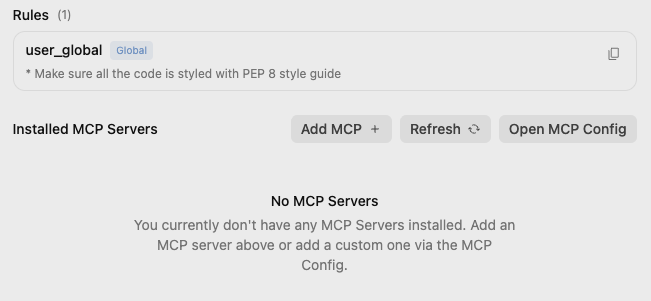
Even though you don't see the rule, MCP server, and the hook, I verified that
they're all available and active.
### AGY CLI
In AGY CLI, there's `agy plugins list` command but it won't recognize installed
plugins by default for some reason. Instead, it's better to use `agy plugins install`
to install and register the plugin in the CLI:
```bash
$ agy plugins install mete-plugin
[ok] mete-plugin
✔ skills : 1 processed
✔ agents : 1 processed
- commands : skipped (not found)
✔ mcpServers : 1 processed
✔ hooks : 1 processed
```
`/skills` shows the skill from the plugin:
```bash
> /skills
...
/Users/atamel/.gemini/config/plugins/mete-plugin/skills · From ~/.gemini/antigravity-cli/skills.json
mete-plugin:mete-skill: This is a dummy skill for testing purposes. It does not provide any useful...
```
`/agents` shows the agent from the plugin:
```bash
> /agents
Available Agents
> ● default Default agent
dependency-modernizer Helps upgrade local packages and verify that project
...
hello-world-agent This is just a Hello World agent...
```
`/mcp` shows you the MCP server from the plugin:
```bash
> /mcp
MCP Servers
Plugins (~/.gemini/config/plugins)
> ✓ cloudrun
```
Unfortunately, `/hooks` does NOT show hooks from the plugin 😔 but you can ask
`which antigravity hooks are installed?`
```bash
> which antigravity hooks are installed?
▸ Thought for 2s, 389 tokens
Examining the Query
The following Antigravity lifecycle hook is installed via mete-plugin in hooks.json:
### Hook: event-logger
Lifecycle Event | Matcher | Command | Timeout
-----------------|---------------|----------------------------------------------------|------------
PreInvocation | N/A | python3 ./scripts/log_hook_event.py PreInvocation | 30s
PostInvocation | N/A | python3 ./scripts/log_hook_event.py PostInvocation | Default (30
PreToolUse | * (all tools) | python3 ./scripts/log_hook_event.py PreToolUse | Default (30
PostToolUse | * (all tools) | python3 ./scripts/log_hook_event.py PostToolUse | Default (30
Stop | N/A | python3 ./scripts/log_hook_event.py Stop | Default (30
```
There's no slash command to see rules either, but you can ask:
```bash
> which rules are installed?
The following rules are currently installed and active:
1. Global User Rule (user_global)
• Directive: Ensure all code is styled according to the PEP 8 style guide.
2. Plugin Rule (mete-plugin)
• Source: mete-rule.md
• Directive: Dummy rule for testing (This is a dummy rule).
```
## Build with Google Plugins
When you install AGY and AGY IDE, you get the option of installing some plugins
from Google. You can also install these later under `Settings` → `Customizations`
→ `Build With Google Plugins`.
There, you can choose plugins for Android, Flutter, Chrome DevTools, and more:
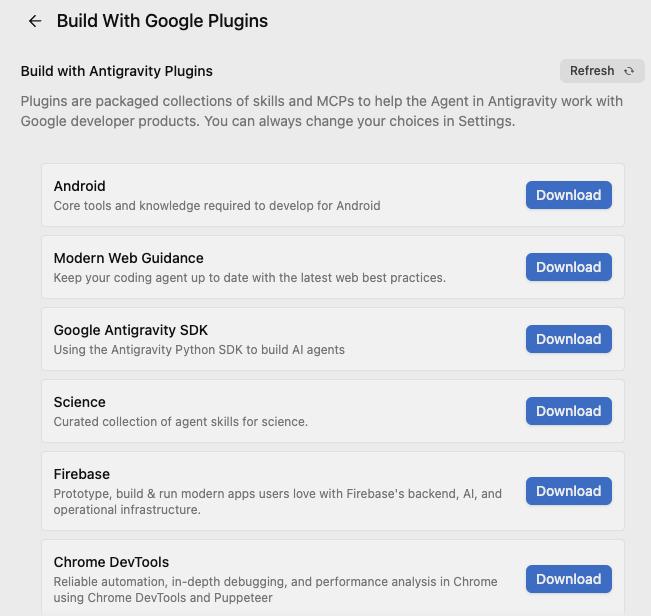
These are mainly a combination of skills and some rules for now. For example,
these are the skills you get when you install the Chrome DevTool plugin:
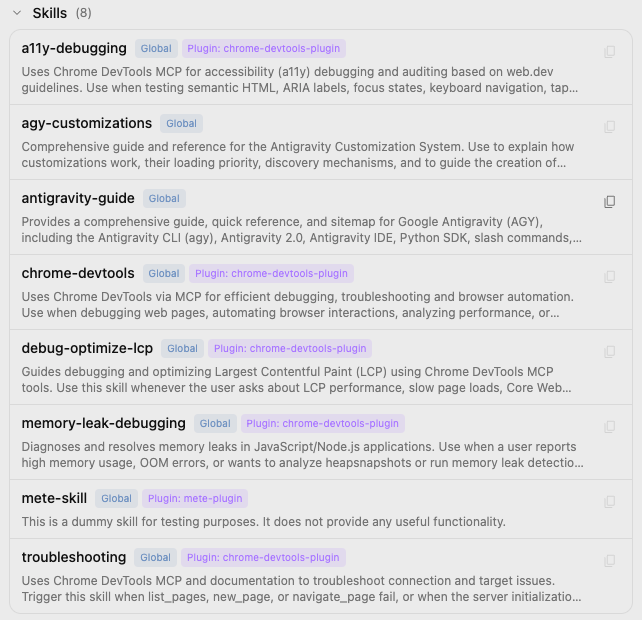
As you can see, skills can add up quickly once you start installing plugins!
## AGY Plugins vs. Agent Plugins
[Agent Plugins](https://agent-plugins.org/) was
[announced](https://developers.googleblog.com/agent-plugins-package-your-skills-tools-and-more/)
recently and it is an open, vendor-neutral specification for packaging skills
and MCP servers into portable plugins.
Here's what an agent plugin looks like:
```text
reports-plugin/
├── plugin.json
├── skills/
│ └── summarize/
│ ├── SKILL.md
│ ├── scripts/
│ └── references/
└── mcp.json
```
As you can see, it's very similar to AGY plugins except `mcp.json` instead of
`mcp_config.json` in AGY plugins. Also AGY plugins can include rules and hooks.
In a nutshell, AGY Plugins is a superset of Agent Plugins and I expect the two
to converge over time.
## Summary
Here's the summary where AGY look for plugins:
```text
~/.gemini/ # GLOBAL
├── config/
│ ├── plugins/ # Plugins
│ │ ├── /
│ │ │ ├── agents/ # Agents (plugin)
│ │ │ ├── hooks.json # Hooks (plugin)
│ │ │ ├── mcp_config.json # MCP servers (plugin)
│ │ │ ├── rules/ # Rules (plugin)
│ │ │ └── skills/ # Skills (plugin)
/ # WORKSPACE
└── .agents/
├── plugins/ # Plugins
│ ├── /
│ │ ├── agents/ # Agents (plugin)
│ │ ├── hooks.json # Hooks (plugin)
│ │ ├── mcp_config.json # MCP servers (plugin)
│ │ ├── rules/ # Rules (plugin)
│ │ └── skills/ # Skills (plugin)
```