ℹ️ Note
This post blog is part of a series, see Summary : Where does Antigravity look for configurations?
I’ve been exploring how to configure and extend Antigravity (AGY).
In today’s post, I’ll explore Plugins, yet another way of configuring AGY. We’ll also explore Build with Google plugins and the differences between AGY plugins and Agent plugins.
Plugins
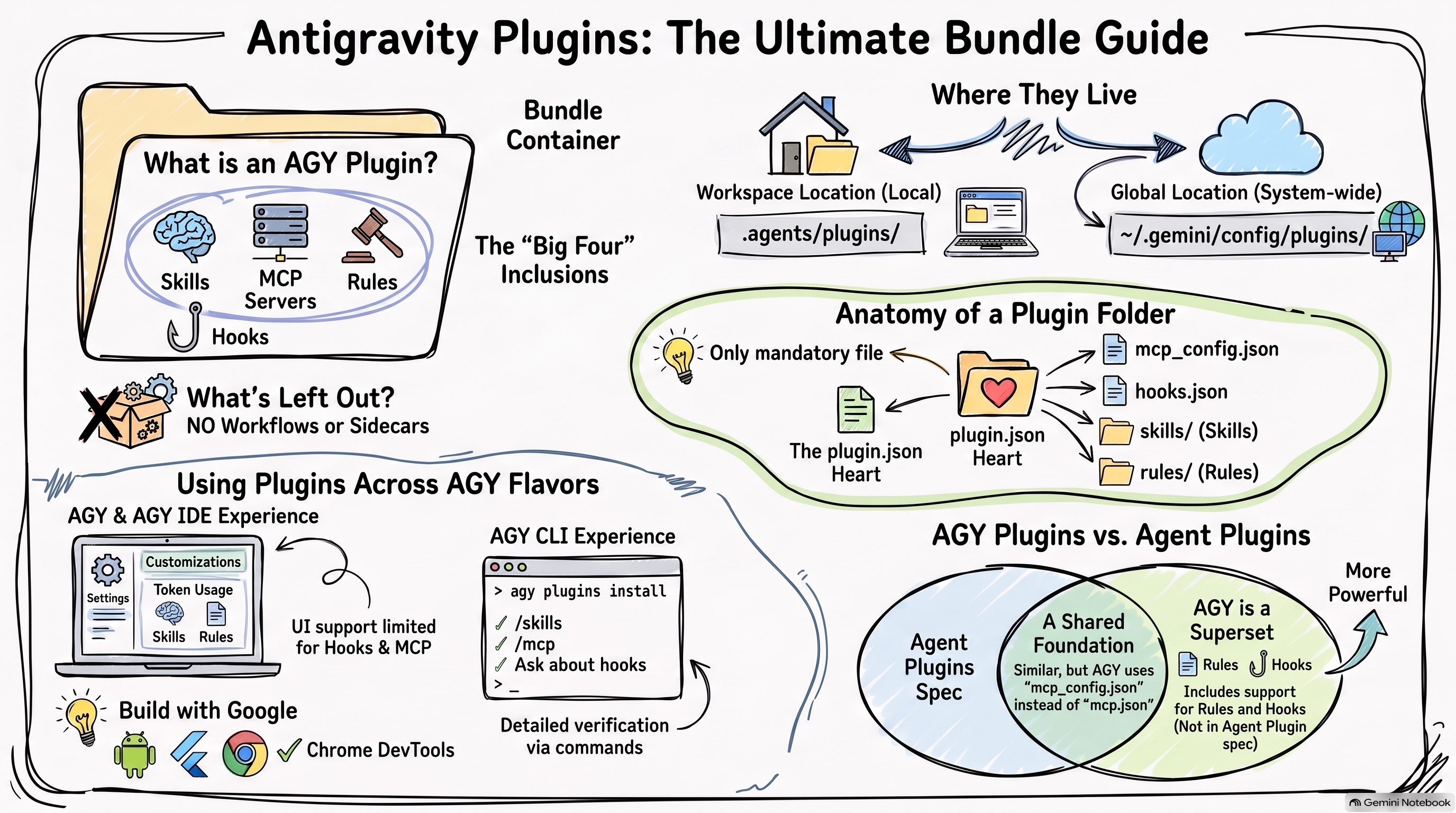
Plugins in AGY are a way to package and group **Agents, Skills, MCP Servers, Rules, and Hooks together. This can be useful when you want to distribute and install a collection of these configuration options in one go. It’s also another way of configuring and extending AGY.
A few things to note about AGY plugins:
- Plugins are not a new configuration option per se. They’re just a way to package existing configuration options together.
- Plugins do NOT support Workflows or Sidecars.
- AGY Plugins is currently a superset of Agent Plugins. We’ll cover this later.
Configuration
Plugins can be applied globally or per workspace and are currently saved to the following locations for all 3 flavours: AGY, AGY CLI, and AGY IDE.
- Workspace:
.agents/plugins/ - Global:
~/.gemini/config/plugins/
Under the plugins folder, you define each plugin with its own configuration:
plugins/
├── <plugin1>/
│   ├── agents/           # Optional agents
│   ├── hooks.json        # Optional hooks
│   ├── mcp_config.json   # Optional MCP servers
│   ├── plugin.json       # Required plugin file
│   ├── rules/            # Optional rules
│   │   └── <rule-name>.md
│   └── skills/           # Optional skills
│       └── <skill-name>/
│           └── SKILL.md
└── <plugin2>/
    └── plugin.json       # Required plugin file
The only mandatory file is plugin.json and it can be as simple as the following:
{
  "name": "my-plugin"
}
Sample Plugin
Let’s now create a sample plugin and see how it works.
I create my dummy plugin in the metes-plugin folder and it includes 1 skill, 1 MCP
server, 1 rule, and 1 hook:
metes-plugin/
├── agents/
│   ├── hello-world-agent.md
├── hooks.json
├── mcp_config.json
├── plugin.json
├── rules/
│   ├── mete-rule.md
├── scripts/
│   └── log_hook_event.py
└── skills/
    └── mete-skill/
        └── SKILL.md
The plugin.json defines the plugin:
{
  "name": "mete-plugin",
  "version": "0.0.1",
  "description": "A test plugin.",
  "author": {
    "name": "Mete Atamel"
  },
  "license": "Apache-2.0"
}
The agent is just a dummy agent for testing purposes:
---
name: hello-world-agent
description: This is just a Hello World agent
---
The skill defined under mete-skill is just a dummy skill for testing purposes:
---
name: mete-skill
description: |
  This is a dummy skill for testing purposes. It does not provide any useful functionality.
---

# Mete Skill

A dummy skill for testing purposes. It does not provide any useful functionality.
The rule defined under rules is also for testing purposes:
---
trigger: always_on
---

This is a dummy rule
The mcp_config.json is equally simple pointing to the Cloud Run MCP server:
{
  "mcpServers": {
    "cloudrun": {
      "command": "npx",
      "args": [
        "-y",
        "@google-cloud/cloud-run-mcp"
      ]
    }
  }
}
The hooks.json and scripts/log_hook_event.py are from my previous Where
does Antigravity look for Hooks? blog
post that simply logs received hook events.
Support in AGY, AGY CLI, and AGY IDE
Once you define a plugin in the files and folders I mentioned above, all 3 flavours of AGY will recognize it. However, the UI support is patchy and slightly different in each.
Let’s take a look.
AGY and AGY IDE
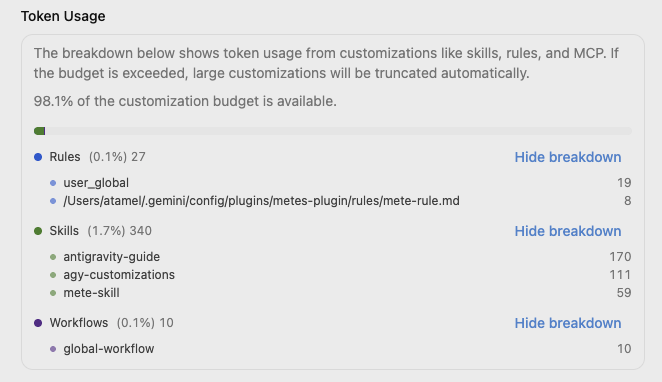
In both AGY and AGY IDE, under Settings → Customizations → Token Usage
you can see the rules, skills, and agents coming from plugins:
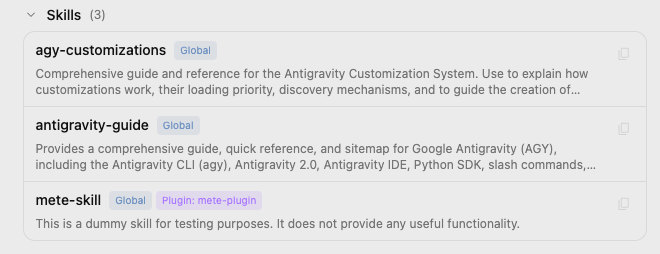
Under Skills section of the same page, you’ll see the skill coming from the plugin:
Under Custom Agents section, you’ll see the agent coming from the plugin:

However, you won’t see the rule under Rules section and the MCP server under
MCP servers. There’s also no UI to see hooks. 😔
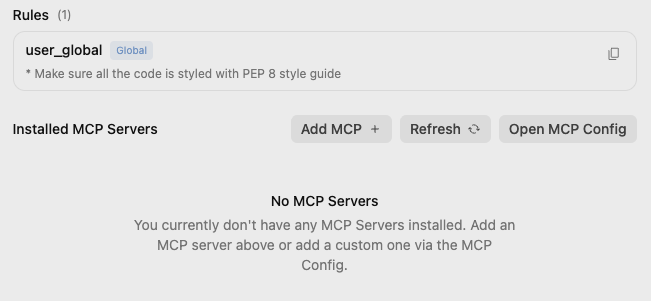
Even though you don’t see the rule, MCP server, and the hook, I verified that they’re all available and active.
AGY CLI
In AGY CLI, there’s agy plugins list command but it won’t recognize installed
plugins by default for some reason. Instead, it’s better to use agy plugins install
to install and register the plugin in the CLI:
$ agy plugins install mete-plugin

[ok]    mete-plugin
        ✔ skills      : 1 processed
        ✔ agents      : 1 processed
        - commands    : skipped (not found)
        ✔ mcpServers  : 1 processed
        ✔ hooks       : 1 processed
/skills shows the skill from the plugin:
> /skills

...

/Users/atamel/.gemini/config/plugins/mete-plugin/skills · From ~/.gemini/antigravity-cli/skills.json
  mete-plugin:mete-skill: This is a dummy skill for testing purposes. It does not provide any useful...
/agents shows the agent from the plugin:
> /agents

Available Agents
> ● default  Default agent
    dependency-modernizer  Helps upgrade local packages and verify that project
...
    hello-world-agent  This is just a Hello World agent...
/mcp shows you the MCP server from the plugin:
> /mcp

MCP Servers

Plugins (~/.gemini/config/plugins)
>  ✓ cloudrun
Unfortunately, /hooks does NOT show hooks from the plugin 😔 but you can ask
which antigravity hooks are installed?
> which antigravity hooks are installed?

▸ Thought for 2s, 389 tokens
  Examining the Query
  The following Antigravity lifecycle hook is installed via mete-plugin in hooks.json:

  ### Hook: event-logger

   Lifecycle Event | Matcher       | Command                                            | Timeout
  -----------------|---------------|----------------------------------------------------|------------
   PreInvocation   | N/A           | python3 ./scripts/log_hook_event.py PreInvocation  | 30s
   PostInvocation  | N/A           | python3 ./scripts/log_hook_event.py PostInvocation | Default (30
   PreToolUse      | * (all tools) | python3 ./scripts/log_hook_event.py PreToolUse     | Default (30
   PostToolUse     | * (all tools) | python3 ./scripts/log_hook_event.py PostToolUse    | Default (30
   Stop            | N/A           | python3 ./scripts/log_hook_event.py Stop           | Default (30
There’s no slash command to see rules either, but you can ask:
> which rules are installed?

The following rules are currently installed and active:

1. Global User Rule (user_global)
    • Directive: Ensure all code is styled according to the PEP 8 style guide.
2. Plugin Rule (mete-plugin)
    • Source: mete-rule.md
    • Directive: Dummy rule for testing (This is a dummy rule).
Build with Google Plugins
When you install AGY and AGY IDE, you get the option of installing some plugins
from Google. You can also install these later under Settings → Customizations
→ Build With Google Plugins.
There, you can choose plugins for Android, Flutter, Chrome DevTools, and more:
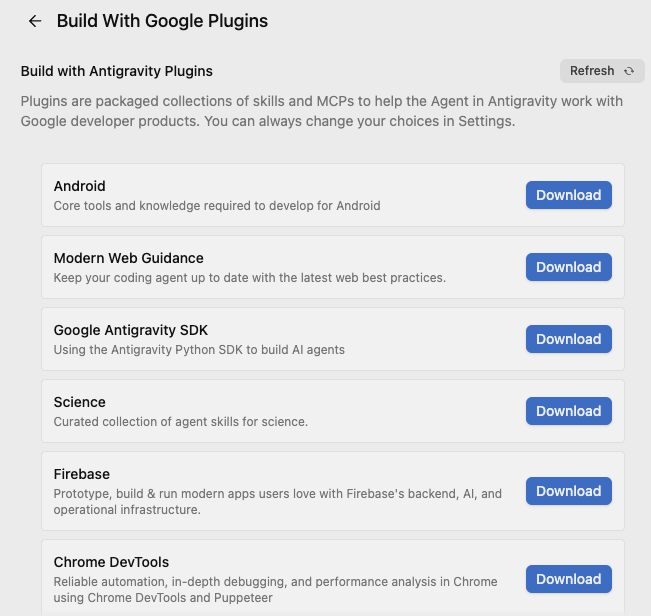
These are mainly a combination of skills and some rules for now. For example, these are the skills you get when you install the Chrome DevTool plugin:
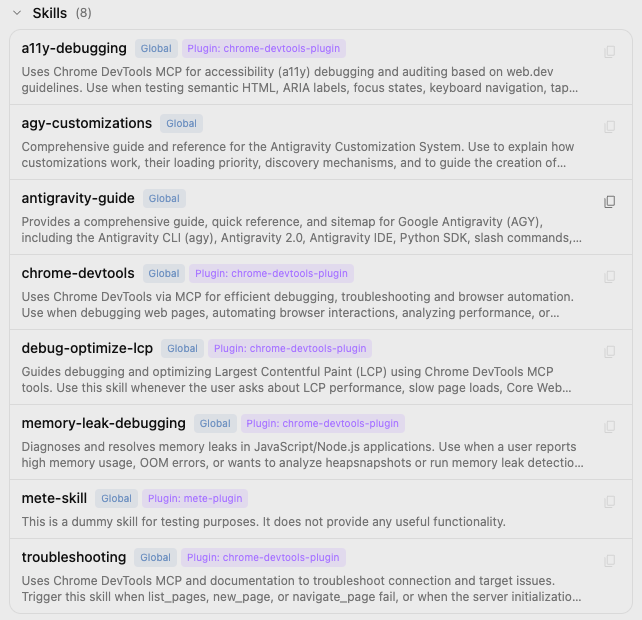
As you can see, skills can add up quickly once you start installing plugins!
AGY Plugins vs. Agent Plugins
Agent Plugins was announced recently and it is an open, vendor-neutral specification for packaging skills and MCP servers into portable plugins.
Here’s what an agent plugin looks like:
reports-plugin/
├── plugin.json
├── skills/
│   └── summarize/
│       ├── SKILL.md
│       ├── scripts/
│       └── references/
└── mcp.json
As you can see, it’s very similar to AGY plugins except mcp.json instead of
mcp_config.json in AGY plugins. Also AGY plugins can include rules and hooks.
In a nutshell, AGY Plugins is a superset of Agent Plugins and I expect the two to converge over time.
Summary
Here’s the summary where AGY look for plugins:
~/.gemini/                         # GLOBAL
├── config/
│   ├── plugins/                   # Plugins
│   │   ├── <plugin-name>/
│   │   │   ├── agents/            # Agents (plugin)
│   │   │   ├── hooks.json         # Hooks (plugin)
│   │   │   ├── mcp_config.json    # MCP servers (plugin)
│   │   │   ├── rules/             # Rules (plugin)
│   │   │   └── skills/            # Skills (plugin)

<workspace-root>/                  # WORKSPACE
└── .agents/
    ├── plugins/                   # Plugins
    │   ├── <plugin-name>/
    │   │   ├── agents/            # Agents (plugin)
    │   │   ├── hooks.json         # Hooks (plugin)
    │   │   ├── mcp_config.json    # MCP servers (plugin)
    │   │   ├── rules/             # Rules (plugin)
    │   │   └── skills/            # Skills (plugin)