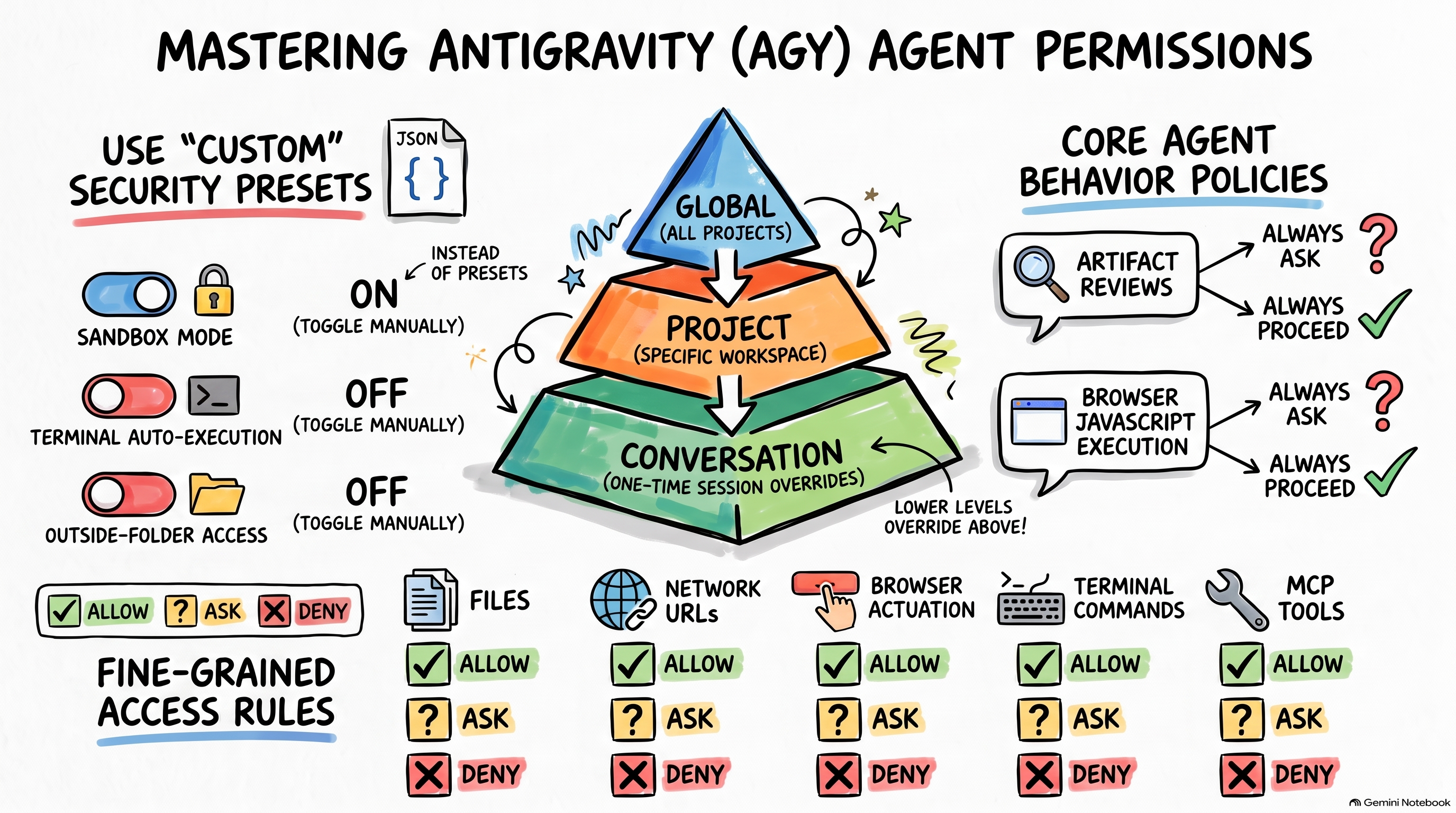
Antigravity (AGY) has an extensive permission system that defines how the agent should behave and what it has access to. However, these permissions are scattered across different settings and saved in various files that might make reasoning them difficult.
In this post, I’ll deep dive into these permission settings and share my learnings.
Permission Hierarchy
Before looking at the permission settings in detail, it’s important to note that the permissions in AGY are organized in a hierarchy:
- Global (user) permissions.
- Project (workspace) permissions.
- Conversation (sesssion) permissions.
Each level inherits the permissions of the level above it but can override them. A project inherits global permissions but it can override them and a conversation can override both project and global permissions.
Global permissions
Global permissions apply to all projects and conversations of the user. They can
be access via Settings -> General and are scattered across Agent Settings,
Agent Behavior, Network Permissions, Terminal & Tooling Permissions and
Browser sections:
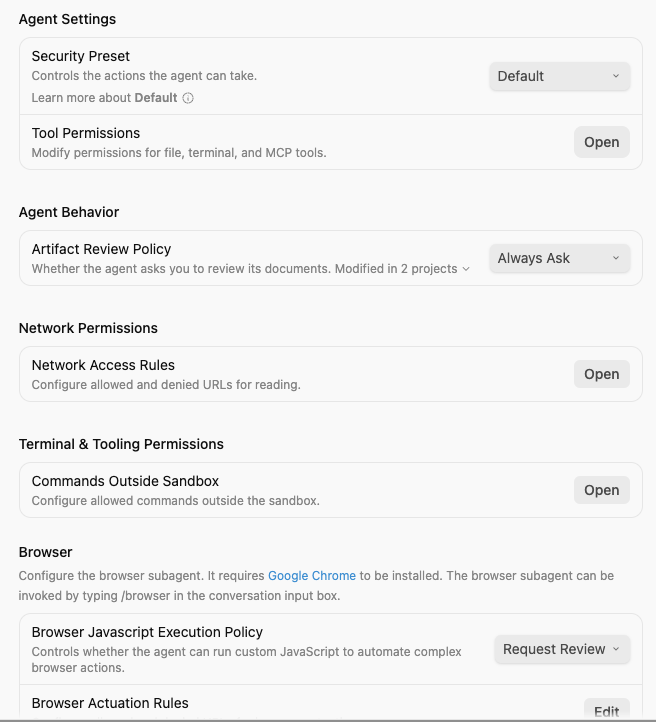
These permissions are persisted in ~/.gemini/config/config.json file.
Project permissions
Project permissions inherit global permissions and can override them at the
project level. These settings can be accessed via Project Settings and
scattered across Agent Settings, Agent Behavior, and Local Permissions
sections:
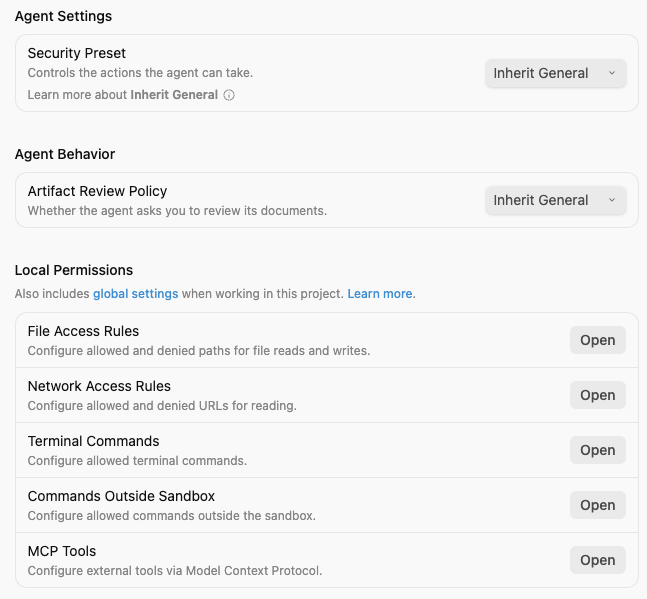
They’re very similar to global settings but arranged slightly differently in the
UI and persisted in ~/.gemini/config/projects/<project_id>.json where
<project_id> is the UUID of the project.
Conversation permissions
Conversation permissions are specific to a single conversation and they are triggered when an agent needs to perform an action that is not allowed by default:
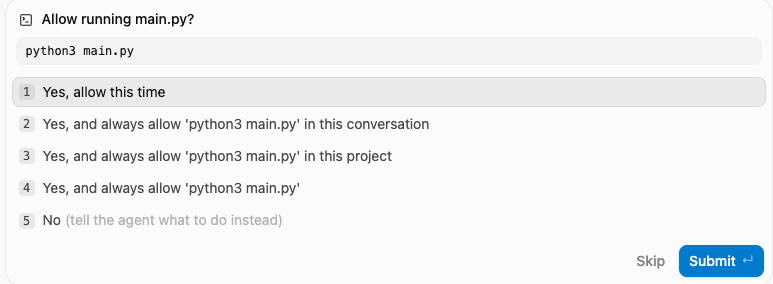
You can allow the action once or only in the current conversation. You also have the option to always allow it at the project level or globally. In both cases, the relevant configuration files are updated.
Permissions
Now, let’s look into different permissions in detail. They’re presented slightly differently depending on whether you’re looking at global or project level settings.
Security preset
Security Preset dropdown is shown under Agent Settings both in global and
project level settings. It is not a permission per say but rather it’s a pre-set
of 3 permissions: Outside of folders file access policy, Terminal Command Auto Execution and Enable Sandbox Mode with the following pre-set configurations:
Default- manual review of terminal commands and files outside project folders.Full Machine- manual review of terminal commands and ability to read/write to any file.Turbo Mode- no review of terminal commands and ability to read/write to any file.Custom- custom settings.
💡 Tip
Always choose
Customin order to see and control the actual 3 underlying permissions.
Let’s break down the individual permissions in more detail.
Outside of folders file access policy
Configures how the agent tries to access files outside of its working folders:
Always Ask(Default)AllowDeny
Terminal command auto execution
Controls whether terminal commands require your approval before running:
Require Review(Default)Proceed in SandboxAlways Proceed
Enable sandbox mode
Restricts agent tools to a secure, isolated local sandbox:
False(Default)True
Artifact review policy
Under Agent Behavior, there’s Artifact Review Policy that determines whether
the agent asks your review of artifacts (e.g. implementation plan) before
proceeding:
Always Ask(Default)Always Proceed
Browser Javascript execution policy
Only in global settings, under Browser, you’ll find Browser Javascript Execution Policy that controls whether the agent can run custom JavaScript to
automate complex browser actions:
Disable(Default)Request ReviewAlways Proceed
Agent Permissions
In addition to the settings above, there’s a number of fine-grained Agent
Permissions on
various actions such as file or network access, MCP tools, terminal commands,
etc. with Deny, Ask, Allow options and a flexible pattern to specify
what’s allowed (e.g. read_file(/path) or read_file(dir), or read_file(*)).
These permissions show up in slightly different places in global and project settings but they’re for the following:
- File Access Rules: Allowed/denied file paths for
read_fileandwrite_fileactions. - Network Access Rules: Allowed/denied URLs for
read_urlaction. - Browser Actuation Rules: Allowed/denied URLs for
execute_urlaction. - Terminal Commands: Allowed/denied terminal commands for
commandaction. - Commands Outside Sandbox: Allowed/denied commands for
unsandboxedaction. - MCP Tools: Allowed/denied MCP tools for
mcpaction.
Configuration files
It’s useful to know where these settings are persisted, in order to back them up or just see what’s being used without having to rely on the UI.
If you set these permissions globally, they end up in
~/.gemini/config/config.json under userSettings as follows:
{
  ...
  "userSettings": {
    "artifactReviewMode": "ARTIFACT_REVIEW_MODE_ALWAYS",
    "autoExecutionPolicy": "CASCADE_COMMANDS_AUTO_EXECUTION_OFF",
    "browserJsExecutionPolicy": "BROWSER_JS_EXECUTION_POLICY_DISABLED",
    "enableTerminalSandbox": false,
    "nonWorkspaceFileAccessPolicy": "AGENT_SETTING_POLICY_ASK",
    "globalPermissionGrants": {
      "allow": [
        "read_file(/Users/atamel/dev/local/testing)",
        "read_url(https://www.bbc.co.uk/)",
        "command(ls)",
        "unsandboxed(ls)",
        "mcp(cloudrun)"
      ],
      "ask": [
        "execute_url(https://www.bbc.co.uk/)",
        "command(ps)"
      ],
      "deny": [
        "write_file(/Users/atamel)",
        "command(rm)"
      ]
    }
  }
}
If you set them per project, they end up in
~/.gemini/config/projects/<project_id>.json under settings as:
{
  ...
  "permissionGrants": {
    "permissionGrants": {
      "allow": [
        "read_file(/Users/atamel/dev/local/testing)",
        "read_url(https://www.bbc.co.uk/)",
        "command(rm)",
        "unsandboxed(ls)",
        "mcp(cloudrun)"
      ],
      "deny": [
        "write_file(/Users/atamel)",
        "command(ls)"
      ],
      "ask": [
        "command(ps)"
      ]
    }
  },
  "settings": {
    "artifactReviewMode": "ARTIFACT_REVIEW_MODE_ALWAYS",
    "autoExecutionPolicy": "CASCADE_COMMANDS_AUTO_EXECUTION_OFF",
    "fileAccessPolicy": "AGENT_SETTING_POLICY_ASK",
    "sandboxMode": false
  }
}
ℹ️ Note
Global and project level settings have slightly different configuration names and organization, as you can see from the json snippets above.
What about AGY CLI and AGY IDE?
Everything I talked about above applies to AGY but you might be wondering: What about AGY CLI and AGY IDE and IDE extensions?
In AGY CLI, there’s a /permissions command that allows you to set some permissions
and some of them end up in ~/.gemini/antigravity-cli/settings.json and some
end up in the global ~/.gemini/config/config.json file. However, it’s not
quite intuitive and I couldn’t figure out exactly which permissions ends up
where and why.
In AGY IDE standalone, it seems like some of the permissions are saved in
totally different place ~/Library/Application Support/Antigravity IDE/User/globalStorage/state.vscdb but I didn’t dig into it further.
In a future post, I might try to explore permissions in AGY CLI and IDE in more detail.
Summary
This is a lot of information but hopefully the following table can be a good reference for all the permissions you can set in AGY:
| Permission | Description | Location | Options | Default |
|---|---|---|---|---|
| Security Preset | Pre-set configuration controlling 3 permissions: Outside of folders file access policy, Terminal Command Auto Execution and Enable Sandbox Mode. | Global & Project (Agent Settings) | Global: Default, Full Machine, Turbo Mode, Custom Project: Inherit General, Default, Full Machine, Turbo Mode, Custom | Global: Default Project: Inherit General |
| Outside of folders file access policy | Controls access to files outside working folders. | Global & Project (Agent Settings via Custom) | Always Ask, Allow, Deny | Always Ask |
| Terminal Command Auto Execution | Controls automatic execution of terminal commands. | Global & Project (Agent Settings via Custom) | Require Review, Proceed in Sandbox, Always Proceed | Require Review |
| Enable Sandbox Mode | Enables or disables sandbox mode. | Global & Project (Agent Settings via Custom) | True, False | False |
| Artifact Review Policy | Controls whether the agent asks for review of artifacts. | Global & Project (Agent Behavior) | Global: Always Ask, Always Proceed Project: Inherit General, Always Ask, Always Proceed | Global: Always Ask Project: Inherit General |
| Browser Javascript Execution Policy | Controls JavaScript execution in the browser. | Global only (Browser) | Disable, Request Review, Always Proceed | Disable |
| File Access Rules | Controls file read and write access (read_file, write_file). | Global: Agent Settings → Tool PermissionsProject: Local Permissions | Allow, Ask, Deny | Ask |
| Network Access Rules | Controls network read access (read_url). | Global: Network PermissionsProject: Local Permissions | Allow, Ask, Deny | Ask |
| Browser Actuation Rules | Controls browser action execution (execute_url). | Global only (Browser) | Allow, Ask, Deny | Ask |
| Terminal Commands | Controls terminal command execution (command). | Global: Agent Settings → Tool PermissionsProject: Local Permissions | Allow, Ask, Deny | Ask |
| Commands Outside Sandbox | Controls execution of commands outside the sandbox (unsandboxed). | Global: Terminal & Tooling PermissionsProject: Local Permissions | Allow, Ask, Deny | Ask |
| MCP Tools | Controls MCP tool usage (mcp). | Global: Agent Settings → Tool PermissionsProject: Local Permissions | Allow, Ask, Deny | Ask |