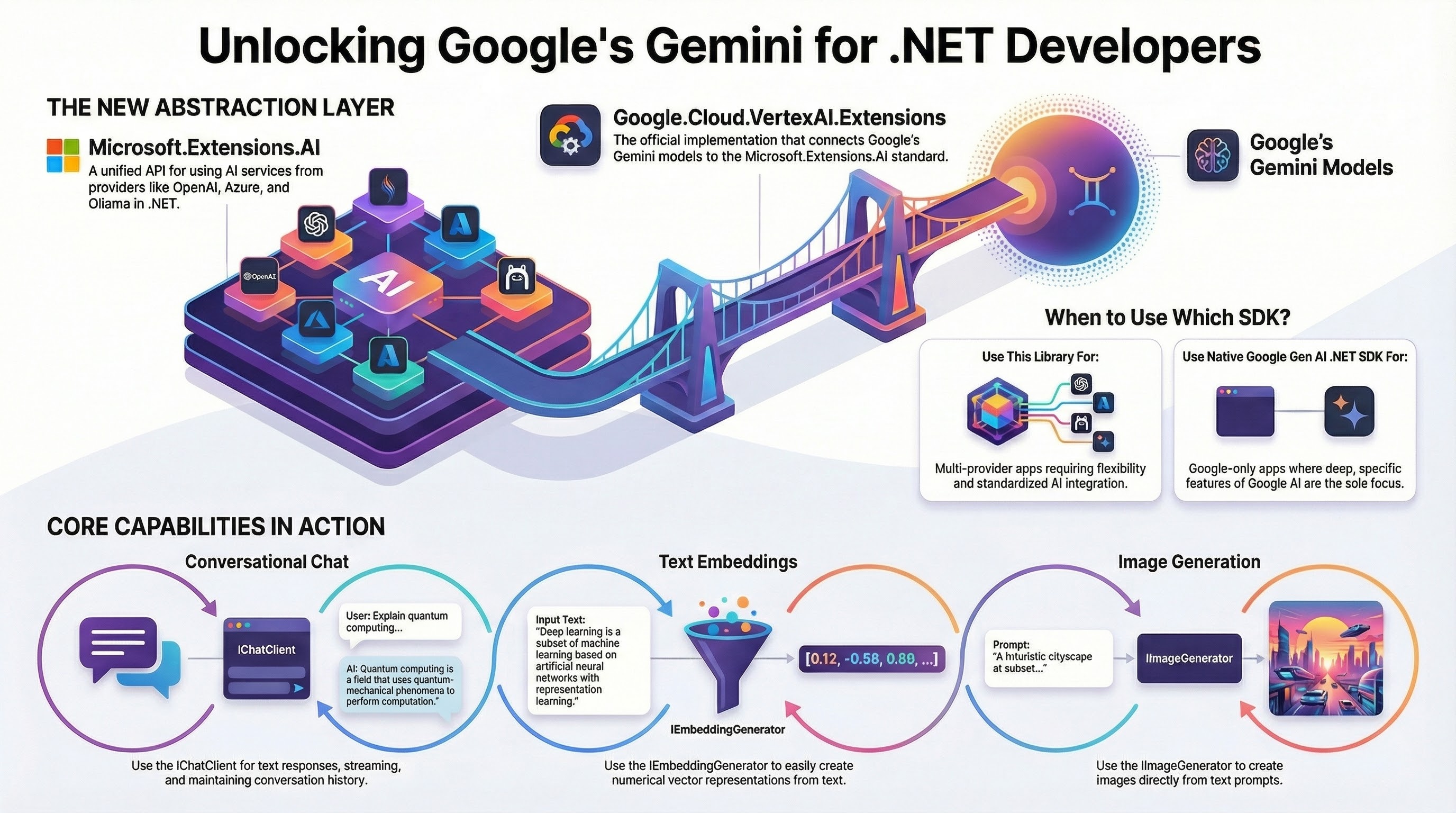
In October 2024, Microsoft announced the Microsoft.Extensions.AI.Abstractions and Microsoft.Extensions.AI libraries for .NET. These libraries provide the .NET ecosystem with essential abstractions for integrating AI services into .NET applications from various providers such as Open AI, Azure, Google.
Today, we’re happy to announce the Google.Cloud.VertexAI.Extensions library. This is the Vertex AI implementation of Microsoft.Extensions.AI. It enables .NET developers to integrate Google Gemini models on Vertex AI via the Microsoft.Extensions.AI abstractions.
Let’s take a look at the details.
ℹ️ This library is currently in pre-release/beta pending user feedback. Please reach out with any feedback you might have.
What’s the Microsoft.Extension.AI library?
Microsoft.Extensions.AI is a set of core .NET libraries that provide a unified layer of C# abstractions for interacting with AI services from different providers such as OpenAI, Azure AI Inference, Ollama.
Core benefits
- Unified API: Delivers a consistent set of APIs and conventions for integrating AI services into .NET applications.
- Flexibility: Allows .NET library authors to use AI services without being tied to a specific provider, making it adaptable to any provider.
- Ease of Use: Enables .NET developers to experiment with different packages using the same underlying abstractions, maintaining a single API throughout their application.
APIs and functionality
There are three core interfaces:
- The
IChatClientinterface defines a client abstraction responsible for interacting with AI services that provide chat capabilities. - The
IEmbeddingGeneratorinterface represents a generic generator of embeddings. - The
IImageGeneratorinterface (experimental) represents a generator for creating images from text prompts or other input.
What’s the Google.Cloud.VertexAI.Extensions library?
Microsoft.Extensions.AI supports providers like OpenAI, Azure, and Ollama. The Google.Cloud.VertexAI.Extensions library is the Vertex AI implementation of Microsoft.Extensions.AI. It enables .NET developers to integrate with Google’s Gemini on Vertex AI via the Microsoft.Extensions.AI abstractions.
What about the Google Gen AI .NET SDK?
At this point, you might be wondering: Doesn’t Google already have a .NET SDK for Gemini?
You’re right. There’s the Google Gen AI .NET SDK that we announced back in October 2025. Developers building applications that will only use Google as an AI provider should continue to use the Google Gen AI .NET SDK. Developers building applications that may use different AI providers (Google, OpenAI, Azure …) will benefit from the Google.Cloud.VertexAI.Extensions library.
Samples
Now that we understand the context, let’s take a look at some samples.
Microsoft.Extensions.AI with Ollama
Before we look into Google.Cloud.VertexAI.Extensions, let’s actually look at the hello world chat sample with Ollama.
using Microsoft.Extensions.AI;
using OllamaSharp;

IChatClient client = new OllamaApiClient(
    new Uri("http://localhost:11434/"), "gemma3:270m");

var response = await client.GetResponseAsync("Why is sky blue?");
Console.WriteLine(response.Text);
This is Ollama using a Gemma3 model. That was easy enough!
Getting started with Google.Cloud.VertexAI.Extensions
To use Google.Cloud.VertexAI.Extensions, first, you need to add the package to your project. It’s currently in preview, so make sure to check for the latest beta version.
dotnet add package Google.Cloud.VertexAI.Extensions --prerelease
You will also need the Microsoft.Extensions.AI package:
dotnet add package Microsoft.Extensions.AI
Chat
To use the IChatClient interface, first you need to initialize the client with Vertex AI specific initialization:
using Google.Cloud.AIPlatform.V1;
using Google.Cloud.VertexAI.Extensions;
using Microsoft.Extensions.AI;

IChatClient client = await new PredictionServiceClientBuilder()
    .BuildIChatClientAsync(EndpointName.FormatProjectLocationPublisherModel(projectId, location, "google",
        "gemini-3-flash-preview"));
Then, you can start asking questions to the model:
var response = await client.GetResponseAsync("Why is the sky blue?");
Console.WriteLine(response.Text);
Note that this sample is identical to the Ollama one and samples are the same across different providers. That’s the beauty of abstractions! The only unique part for Vertex AI is how the client is initialized.
You can also get back streaming responses:
await foreach (ChatResponseUpdate update in client.GetStreamingResponseAsync("Why is the sky blue?"))
{
    Console.Write(update.Text);
}
You can also keep track of the chat history and send it along:
List<ChatMessage> history = [];
while (true)
{
    Console.Write("User: ");
    history.Add(new(ChatRole.User, Console.ReadLine()));

    var response = await client.GetResponseAsync(history);
    Console.WriteLine($"AI: {response}");

    history.AddMessages(response);
}
Embeddings
For embeddings, create an embedding generator:
IEmbeddingGenerator<string, Embedding<float>> generator = await new PredictionServiceClientBuilder()
    .BuildIEmbeddingGeneratorAsync(EndpointName.FormatProjectLocationPublisherModel(projectId, location,
        "google", "gemini-embedding-001"));
Generate embeddings for several inputs:
GeneratedEmbeddings<Embedding<float>> embeddings = await generator.GenerateAsync(["Hello", "World"]);
foreach (Embedding<float> embedding in embeddings)
{
    Console.WriteLine(string.Join(",", embedding.Vector.ToArray()));
}
Image Generation
Image generation follows the same pattern.
Create an image generator for Vertex AI:
IImageGenerator generator = await new PredictionServiceClientBuilder()
    .BuildIImageGeneratorAsync(EndpointName.FormatProjectLocationPublisherModel(projectId, location, "google",
        "imagen-4.0-fast-generate-001"));
Generate an image:
ImageGenerationResponse response = await generator.GenerateImagesAsync("A cute baby sea otter");

foreach (var image in response.Contents.OfType<DataContent>())
{
    string path = $"{Path.GetRandomFileName()}.png";
    File.WriteAllBytes(path, image.Data.Span);
    Console.WriteLine($"Image saved to {path}");
    Process.Start(new ProcessStartInfo(path) { UseShellExecute = true });
}
And you should see a cute baby sea otter 🙂

The source code for all the samples is in my Google.Cloud.VertexAI.Extensions samples repo on GitHub.
Conclusion
In this blog post, we explored the Google.Cloud.VertexAI.Extensions library to enable .NET developers to Google’s Gemini models via the Microsoft.Extension.AI library. If you have any questions or feedback about the library, please reach out to me on X @meteatamel or LinkedIn meteatamel.
Here are some links to explore more:
- Introducing Microsoft.Extensions.AI Preview – Unified AI Building Blocks for .NET
- Microsoft.Extensions.AI libraries documentation
- Microsoft.Extension.AI library
- Google.Cloud.VertexAI.Extensions library
- Google.Cloud.VertexAI.Extensions source code
- Google.Cloud.VertexAI.Extensions samples