Beyond coding projects, I use Antigravity (AGY) all the time for personal tasks
and random day-to-day questions—like trip planning, tax research, quick scripts,
or brainstorming. Rather than creating a separate project folder for every
little topic, I keep a single project called llm-conversations for all my
miscellaneous chats and tasks.
However, using a single project for unrelated conversations comes with an annoying problem: context bleed and clutter. By default, every conversation shares the same root folder, so the agent sees files from unrelated chats, litters the root directory with random markdown files and scripts, and leaves behind orphaned files even after you delete a conversation in the UI.
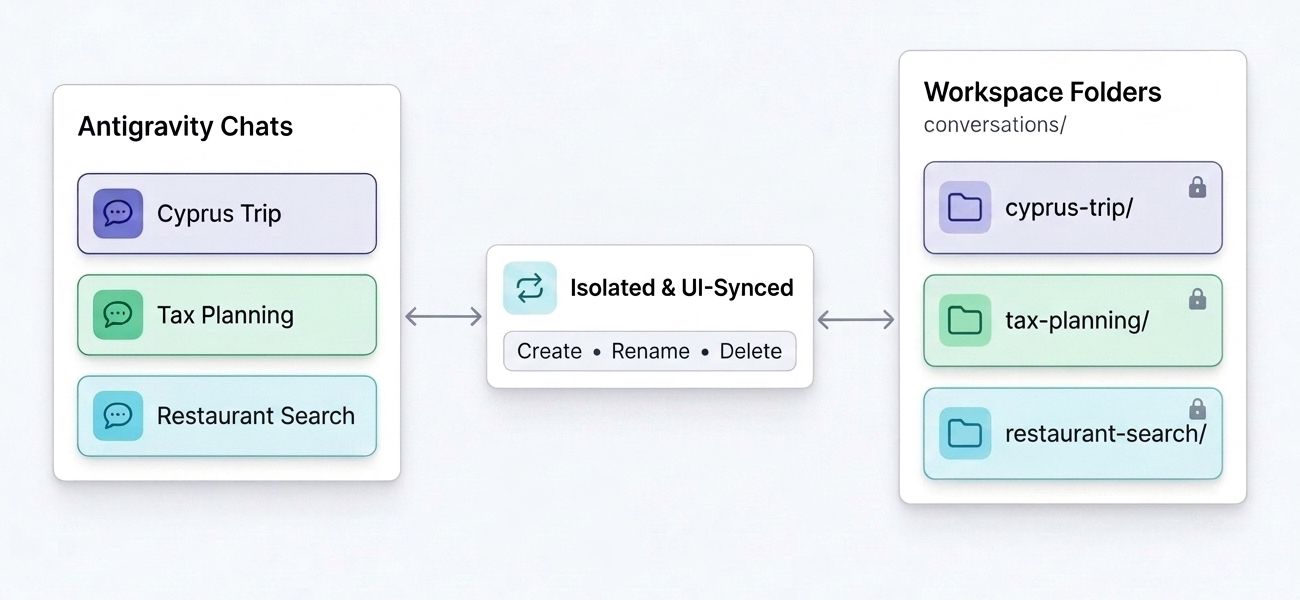
To solve this, I combined Antigravity Rules and Hooks to build a multi-conversation workspace template where every chat gets its own isolated subfolder that stays automatically synced with the Antigravity UI. In this post, I’ll walk through how it works and how you can set it up using my llm-conversations-template repository.
What does the Multi-Conversation Workspace do?
With a workspace rule and a lightweight PreInvocation hook, this setup gives
you:
- 1 Conversation = 1 Subfolder: Every new chat automatically works inside
conversations/<chat-title>/(for example,conversations/cyprus-trip/orconversations/tax-planning/). - Zero Context Bleed: The agent is scoped strictly to the active
conversation’s subfolder for reading, searching, editing, and running
commands. The project root stays clean with
README.mdas the only root file. - UI-Synced Lifecycle: Rename or delete a chat in the Antigravity sidebar and its subfolder is automatically renamed or cleaned up on disk on the next turn.
- Chat Announcements & On-Demand Git Sync: Whenever a subfolder is created, renamed, or deleted, the agent announces it at the top of its response, and changes are only committed/pushed to GitHub when you explicitly ask.
Let’s look at how all the pieces fit together.
Repository Structure
Here is the structure of the workspace in llm-conversations-template:
llm-conversations/
├── .agents/
│   ├── hooks.json                          # Configures the PreInvocation hook
│   ├── rules/
│   │   └── conversation-isolation.md       # Workspace isolation & Git sync rules for the agent
│   └── scripts/
│       └── cleanup-conversations.py        # Syncs folder renames & deletes orphaned folders
├── .conversations.json                     # Local Conversation ID -> subfolder map (git-ignored)
├── .gitignore
├── README.md                               # Project documentation (only file in root)
└── conversations/
    └── <conversation-subfolder>/           # Isolated directory per conversation
There are two main components driving this workflow under .agents/: an
always_on Workspace Rule and a PreInvocation Hook.
Step 1: Per-conversation isolation with a Workspace Rule
First, .agents/rules/conversation-isolation.md
defines an always_on rule that instructs the agent how to manage subfolders
and stay isolated inside the current conversation’s directory.
Every Antigravity conversation has a unique Conversation ID injected into the
agent’s context (under <user_information>). The rule instructs the agent to
maintain a local mapping between each Conversation ID and its assigned
kebab-case subfolder in .conversations.json at the workspace root:
{
  "32392475-06f0-4146-835d-66100755ec3e": "cyprus-trip",
  "903266d9-0539-412e-baad-97f5b1a3c744": "tax-planning"
}
ℹ️ Note
.conversations.jsonis added to.gitignorebecause conversation IDs are specific to your local Antigravity installation, even if you back up yourconversations/folder to a private GitHub repository.
Here is the core isolation logic from .agents/rules/conversation-isolation.md:
---
trigger: always_on
description: Per-conversation subfolder isolation and on-demand GitHub sync rules for this workspace.
---

# Per-Conversation Subfolder Isolation Rules

This workspace hosts multiple independent conversations on different topics.
Every conversation MUST stay isolated within its own subfolder inside
`<workspace-root>/conversations/`.

## 1. Subfolder Creation & Naming
- Each conversation has a unique `Conversation ID` (provided in `<user_information>`).
- Maintain a mapping between `Conversation ID` and its subfolder name in
  `.conversations.json` at the workspace root (format: `{"<conversation-id>": "<subfolder-name>"}`).
- When a conversation begins:
  1. Check `.conversations.json` in the workspace root to see if the current
     `Conversation ID` already has an assigned subfolder.
  2. If not, use the suggested subfolder name from the `PreInvocation` hook
     message (if provided), or derive a concise, descriptive `kebab-case`
     subfolder name that matches the conversation topic/name (e.g.,
     `cyprus-trip`, `tax-planning`), create
     `<workspace-root>/conversations/<subfolder-name>`, and record
     `<subfolder-name>` in `.conversations.json`.

## 2. Strict Read/Write Isolation
- **Read Scope**: ONLY read, search (`grep_search`, `find_by_name`), or inspect
  files inside the current conversation's assigned subfolder
  `<workspace-root>/conversations/<subfolder-name>/` (plus `.conversations.json`
  at the workspace root for setup). Do NOT read files in the workspace root or
  in other conversation subfolders unless the user explicitly instructs you to
  access a specific path outside your subfolder.
- **Write & Command Scope**: Create, edit, and save all files inside
  `<workspace-root>/conversations/<subfolder-name>/`, and run shell commands
  with `<workspace-root>/conversations/<subfolder-name>` as the working
  directory (`Cwd`) whenever possible.
The rule also enforces two quality-of-life behaviors:
- Visible Folder Announcements: Whenever a conversation subfolder is
created, renamed, or deleted, the agent announces it right at the top of its
response so you always know what happened on disk:
- 📁 Folder created:
conversations/<subfolder-name>/ - 📁 Folder renamed:
conversations/<old-name>/→conversations/<new-name>/ - 🗑️ Folder deleted:
conversations/<subfolder-name>/(conversation deleted)
- 📁 Folder created:
- On-Demand GitHub Sync: The agent never commits or pushes automatically. Whenever you reach a milestone or want to back up your conversations, you can simply say “sync” or “push changes” in chat.
Step 2: Automatic UI syncing with a PreInvocation Hook
A workspace rule alone can isolate new conversations, but what happens when you rename a conversation in the Antigravity sidebar, or delete an old conversation from the UI? The agent inside an active chat doesn’t automatically know what you renamed or deleted in the sidebar unless something checks the Antigravity state on disk.
That’s where .agents/hooks.json
comes in. It registers a PreInvocation hook that runs
.agents/scripts/cleanup-conversations.py
automatically before each agent turn:
{
  "sync-and-cleanup-conversations": {
    "PreInvocation": [
      {
        "type": "command",
        "command": "python3 ./scripts/cleanup-conversations.py",
        "timeout": 10
      }
    ]
  }
}
At a high level, cleanup-conversations.py keeps the workspace folders in sync
with the Antigravity UI in three ways:
- Creating Subfolders: For a new conversation, the hook reads the current
conversation title from Antigravity’s local SQLite database
(
conversation_summaries.db) and suggests a matchingconversations/<kebab-case-name>folder to the agent. - Renaming Subfolders: If you rename a conversation in the Antigravity
sidebar, the hook detects the title change on the next turn, renames
conversations/<old-name>/→conversations/<new-name>/on disk, updates.conversations.json, and instructs the agent to announce the rename in chat. - Deleting Orphaned Subfolders: If you delete a conversation in the
Antigravity UI, its directory in
~/.gemini/antigravity/brain/<conversation-id>is removed. On the next turn of any conversation, the hook notices that the brain directory no longer exists, deletes the orphanedconversations/<subfolder-name>/directory from the workspace, cleans up.conversations.json, and instructs the agent to announce the deletion in chat.
Using the template for your own conversations
To set up your own multi-conversation workspace:
- Create a new private repository on GitHub from the
llm-conversations-template
template (or clone it and point
originto your own private repository). - Remove
conversations/from.gitignorein your private repository if you want your conversation folders to be backed up when you ask the agent to sync (it is git-ignored by default in the public template so test conversations aren’t committed accidentally). - Open the repository folder in Antigravity and start a conversation—your first
topic folder will be created automatically under
conversations/and announced at the top of the agent’s reply.
Wrapping up
Combining a workspace rule with a PreInvocation hook turns a single
Antigravity project into a clean, self-maintaining workspace for all your
day-to-day conversations—without context bleed or leftover folder clutter.
For the full configuration and script, check out the template repository on GitHub:
See also
- Agentic Commerce Protocols - UCP and AP2
- Antigravity Plugin Marketplace in Action: Auditing My Talk Slides with the Google Slides Plugin
- Testing and Serving A2A Agents from the Terminal with A2A CLI
- Google Chat Unread Messages Brief with Workspace Studio and Gemini
- 6 Years of Tech Debt, 1 Prompt: Modernizing a Legacy App with Gemini 4