In my Scheduling Tasks in Antigravity
and Where does Antigravity look for Sidecars?
posts, I looked at how recurring tasks in Antigravity
(now under the
Automations panel and /automation command) run as "builtin": "schedule" sidecars that
survive app restarts.
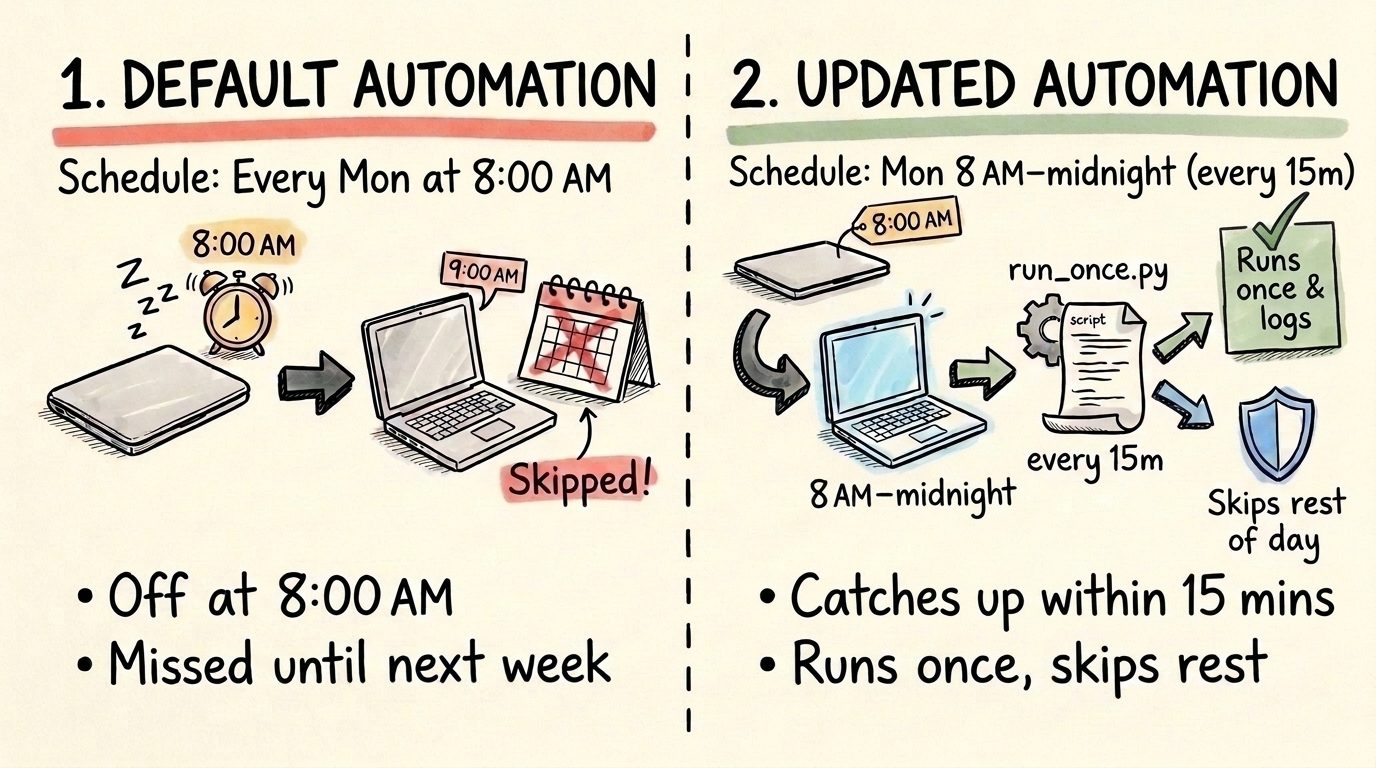
Recently, I hit a practical question with my morning automations: If I have an automation scheduled for 8:00 AM, but my laptop is off, will it run when I turn my laptop back on at 9:00 AM?
In today’s post, I’ll show what happens under the hood when your laptop is asleep vs. powered off,
and how to set up a lightweight run_once.py wrapper and rule so missed automations automatically
catch up in their own project—without running twice if they already ran on schedule.
Laptop asleep vs. powered off
When you enable an automation in Antigravity, it runs a built-in Go scheduler process configured
in ~/.gemini/config/sidecars/<automation-id>/sidecar.json. How it handles a missed schedule
depends entirely on whether that process stayed alive:
- Laptop asleep (lid closed, Antigravity left open) -> Runs on wake: Because the
schedulesidecar process stays in memory with an active timer targeting08:00, waking macOS at09:00causes the past-due timer to expire and trigger the automation immediately. - Laptop powered off (or Antigravity quit) -> Skipped: When Antigravity shuts down, the
scheduler exits cleanly on
SIGINT. When you boot up and open Antigravity at09:00, the scheduler starts fresh, calculates the next future cron match from09:00, and silently skips the missed08:00slot.
You can see this directly in ~/.gemini/antigravity/sidecar_data/<automation-id>/logs/sidecar.log
when a Friday 05:00 automation misses its window while the app is closed overnight:
2026-11-12 16:38:40 [schedule] Shutting down cleanly on signal: interrupt
=== sidecar "weekly-content-radar" started at 2026-11-13T07:43:46Z ===
2026-11-13 07:43:46 [schedule] Scheduler started for schedule: "CRON_TZ=Europe/London 0 5 * * 5"
2026-11-13 07:43:46 [schedule] Next execution scheduled in 165h16m13s (at 2026-11-20 05:00:00 UTC)
For a daily automation, you lose a day; for a weekly automation, it waits another full week unless you notice and click Run manually.
Why not a single startup catch-up sidecar?
At this point, you might be wondering: Why not create a single helper sidecar that runs whenever Antigravity starts, checks which automations missed their schedule, and triggers them?
I had the same thought, and hit an important security boundary. As I covered in
Agent Permissions in Antigravity
, each
automation gets its own dedicated projectId and pre-approved agent_permissions in
~/.gemini/config/config.json. When a sidecar invokes agentapi new-conversation, Antigravity
scopes that call strictly to the calling sidecar’s own project:
- There is no
--project-idflag onagentapito launch a conversation inside another automation’s project. - There is no CLI subcommand (such as
agentapi run-sidecar <id>) to programmatically click another automation’s Run button.
That means if you want each missed automation to still run inside its own project (with its own
permissions and its manual Run button intact in the Automations panel), the catch-up check
needs to wrap agentapi inside each automation’s own sidecar.json.
ℹ️ Note
You could also replace
"builtin": "schedule"with"command": "python3"and write a custom daemon loop, which catches up the instant Antigravity launches. The trade-off is that Antigravity treats"command"entries as continuous background sidecars rather than scheduled automations, so you lose the manual Run button in the UI.
Catch-up window + run_once.py
Instead of firing at a single minute (0 8 * * 1), we change the cron expression to
*/15 8-23 * * 1 and pair it with a small guard script (run_once.py) so the automation still
only runs once.
Only the first two cron fields change (* * 1 still means every Monday):
8->8-23(from 8:00 AM until midnight): Expands the schedule from just the 8 AM hour to every remaining hour of Monday (08:00through23:45), so even if you open your laptop late at night, it can still catch up that day.0->*/15(every 15 minutes): Retries at:00,:15,:30, and:45across those hours. If your laptop is on at 8:00 AM, it runs on time andrun_once.pyskips every remaining 15-minute tick in ~20ms; if your laptop was off at 8:00 AM, the very first 15-minute tick after you open Antigravity triggers the automation, logs the catch-up, and skips the rest of the day.
Under the hood, Antigravity already gives sidecars everything run_once.py needs—with zero extra
flags required:
- Current working directory (
sidecar.json): Antigravity sets each sidecar’s directory as the working directory, sorun_once.pyreadsargs[0]in./sidecar.jsonto infer bothCRON_TZand the intended start time (for example,08:00from*/15 8-23). $ANTIGRAVITY_EXECUTABLE_DATA_DIR: Points to~/.gemini/antigravity/sidecar_data/<id>/data/for persistent state (last_run.json), alongside Antigravity’s own run records in../events/*.json.- Manual UI runs (
*_manual.log): Clicking Run manually in the UI creates a*_manual.logfile in../logs/right before execution, allowingrun_once.pyto let manual runs bypass the once-per-day guard.
Save the following script as ~/.gemini/config/sidecars/run_once.py (and make it executable with
chmod +x ~/.gemini/config/sidecars/run_once.py):
#!/usr/bin/env python3
"""Zero-flag run-once catch-up wrapper for Antigravity `"builtin": "schedule"` automations."""

from __future__ import annotations

from datetime import datetime, timedelta, timezone
import fcntl
import json
import os
from pathlib import Path
import subprocess
import sys
import time
from zoneinfo import ZoneInfo

MANUAL_LOG_WINDOW_SECONDS = 10.0
GRACE_MINUTES = 5


def resolve_paths() -> tuple[str, Path, Path, Path, Path, Path | None]:
    env_data_dir = os.environ.get("ANTIGRAVITY_EXECUTABLE_DATA_DIR")
    if env_data_dir:
        data_dir = Path(env_data_dir).expanduser().resolve()
        sidecar_root = data_dir.parent
    else:
        sidecar_root = Path.home() / ".gemini" / "antigravity" / "sidecar_data" / Path.cwd().name
        data_dir = sidecar_root / "data"

    sidecar_id = sidecar_root.name
    candidates = [
        Path.cwd() / "sidecar.json",
        Path.home() / ".gemini" / "config" / "sidecars" / sidecar_id / "sidecar.json",
    ]
    sidecar_json = next((p for p in candidates if p.is_file()), None)
    return (
        sidecar_id,
        data_dir,
        sidecar_root / "events",
        sidecar_root / "logs",
        sidecar_root.parent / "automation-catchup.log",
        sidecar_json,
    )


def infer_schedule_from_cron(cron_expr: str) -> tuple[str | None, str]:
    tokens = cron_expr.strip().split()
    tz_name: str | None = None
    while tokens and (tokens[0].startswith("CRON_TZ=") or tokens[0].startswith("TZ=")):
        tz_name = tokens.pop(0).split("=", 1)[1]

    def first_int(field: str) -> int:
        base = field.split("/")[0].split(",")[0].split("-")[0]
        return 0 if base == "*" else int(base)

    return tz_name, f"{first_int(tokens[1]):02d}:{first_int(tokens[0]):02d}"


def resolve_schedule(sidecar_json: Path | None) -> tuple[ZoneInfo | timezone, str, str]:
    if sidecar_json is None:
        raise SystemExit("[run_once] sidecar.json not found.")
    cron_args = json.loads(sidecar_json.read_text(encoding="utf-8")).get("args") or []
    tz_name, scheduled_time = infer_schedule_from_cron(cron_args[0])
    if tz_name:
        return ZoneInfo(tz_name), tz_name, scheduled_time
    local_tz = datetime.now().astimezone().tzinfo or timezone.utc
    return local_tz, str(local_tz), scheduled_time


def is_manual_ui_trigger(logs_dir: Path, now_epoch: float) -> bool:
    if not logs_dir.is_dir():
        return False
    return any(
        now_epoch - p.stat().st_mtime <= MANUAL_LOG_WINDOW_SECONDS
        for p in logs_dir.glob("*_manual.log")
    )


def latest_successful_run_epoch(data_dir: Path, events_dir: Path) -> float | None:
    latest: float | None = None
    state_file = data_dir / "last_run.json"
    if state_file.is_file():
        try:
            ts = float(json.loads(state_file.read_text()).get("last_run_epoch", 0))
            if ts > 0:
                latest = ts
        except (OSError, ValueError, TypeError):
            pass

    if events_dir.is_dir():
        for event_file in events_dir.glob("*.json"):
            try:
                payload = json.loads(event_file.read_text())
                if payload.get("error"):
                    continue
                ts_ms = payload.get("timestampMs") or payload.get("commandInvocationTimestampMs")
                ts = (float(ts_ms) / 1000.0) if ts_ms else event_file.stat().st_mtime
                if ts > 0:
                    latest = ts if latest is None else max(latest, ts)
            except (OSError, ValueError, TypeError):
                continue
    return latest


def format_delay(delta: timedelta) -> str:
    hours, minutes = divmod(max(0, int(delta.total_seconds() // 60)), 60)
    return f"+{hours}h{minutes:02d}m" if hours and minutes else (f"+{hours}h" if hours else f"+{minutes}m")


def main() -> int:
    cmd = sys.argv[1:]
    if cmd and cmd[0] == "--":
        cmd = cmd[1:]
    if not cmd:
        raise SystemExit("[run_once] missing command to execute.")

    sidecar_id, data_dir, events_dir, logs_dir, catchup_log, sidecar_json = resolve_paths()
    tz, tz_label, scheduled_time = resolve_schedule(sidecar_json)
    sched_hour, sched_minute = (int(x) for x in scheduled_time.split(":", 1))

    now_epoch = time.time()
    now_local = datetime.fromtimestamp(now_epoch, tz=tz)
    scheduled_dt = now_local.replace(hour=sched_hour, minute=sched_minute, second=0, microsecond=0)

    data_dir.mkdir(parents=True, exist_ok=True)
    with (data_dir / "run_once.lock").open("w") as lock_file:
        try:
            fcntl.flock(lock_file.fileno(), fcntl.LOCK_EX | fcntl.LOCK_NB)
        except BlockingIOError:
            return 0

        manual = is_manual_ui_trigger(logs_dir, now_epoch)
        if not manual and now_local < scheduled_dt:
            return 0

        last_epoch = latest_successful_run_epoch(data_dir, events_dir)
        if not manual and last_epoch is not None:
            last_local = datetime.fromtimestamp(last_epoch, tz=tz)
            if last_local.date() == now_local.date() and last_local >= scheduled_dt - timedelta(minutes=2):
                print(
                    f"{now_local:%Y-%m-%d %H:%M:%S %Z} [run_once] Already ran for today's "
                    f"{scheduled_time} slot at {last_local:%H:%M:%S %Z}; skipping.",
                    flush=True,
                )
                return 0

        delay = now_local - scheduled_dt
        is_catchup = (not manual) and (delay > timedelta(minutes=GRACE_MINUTES))
        delay_str = format_delay(delay)

        if is_catchup:
            print(
                f"{now_local:%Y-%m-%d %H:%M:%S %Z} [run_once] CATCH-UP: '{sidecar_id}' missed its "
                f"scheduled {scheduled_time} {tz_label} slot ({delay_str} late); running now.",
                flush=True,
            )

        proc = subprocess.run(cmd, capture_output=True, text=True)
        if proc.stdout:
            sys.stdout.write(proc.stdout)
            sys.stdout.flush()
        if proc.stderr:
            sys.stderr.write(proc.stderr)
            sys.stderr.flush()

        conv_id = "unknown"
        try:
            conv_id = json.loads(proc.stdout).get("response", {}).get("newConversation", {}).get("conversationId", "unknown")
        except (ValueError, TypeError, AttributeError):
            pass

        if is_catchup:
            status = "ok" if proc.returncode == 0 else f"exit={proc.returncode}"
            with catchup_log.open("a", encoding="utf-8") as f:
                f.write(
                    f"{now_local:%Y-%m-%d %H:%M:%S %Z} | {sidecar_id} | CATCH-UP | "
                    f"scheduled={scheduled_time} {tz_label} | ran={now_local:%H:%M} ({delay_str} late) | "
                    f"status={status} | conversationId={conv_id}\n"
                )

        if proc.returncode == 0:
            (data_dir / "last_run.json").write_text(
                json.dumps(
                    {
                        "sidecar_id": sidecar_id,
                        "scheduled_time": scheduled_time,
                        "timezone": tz_label,
                        "last_run_epoch": time.time(),
                        "conversation_id": conv_id,
                    },
                    indent=2,
                )
                + "\n"
            )
        return proc.returncode


if __name__ == "__main__":
    raise SystemExit(main())
Updating sidecar.json (before vs. after)
Here is what a standard Monday 8:00 AM automation’s sidecar.json looks like before:
{
  "builtin": "schedule",
  "restart_policy": "always",
  "args": [
    "CRON_TZ=Europe/London 0 8 * * 1",
    "agentapi",
    "new-conversation",
    "--",
    "Summarize my open pull requests and highlight any failing checks."
  ],
  "display_name": "Monday PR Check",
  "description": "Every Monday at 8:00 AM (Europe/London), summarizes open pull requests."
}
And here is how it looks after—only two changes in args (0 8 * * 1 becomes */15 8-23 * * 1,
and "python3", ".../run_once.py" is placed right before "agentapi"), while builtin,
restart_policy, agent_permissions, and its projectId stay untouched:
{
  "builtin": "schedule",
  "restart_policy": "always",
  "args": [
    "CRON_TZ=Europe/London */15 8-23 * * 1",
    "python3",
    "/Users/<your-user>/.gemini/config/sidecars/run_once.py",
    "agentapi",
    "new-conversation",
    "--",
    "Summarize my open pull requests and highlight any failing checks."
  ],
  "display_name": "Monday PR Check",
  "description": "Every Monday at 8:00 AM (Europe/London, with catch-up until midnight), summarizes open pull requests."
}
Whenever a missed automation catches up later in the day, run_once.py logs it both in that
automation’s sidecar.log (visible under Automations -> Logs in the UI) and in a central
~/.gemini/antigravity/sidecar_data/automation-catchup.log file:
2026-11-16 10:00:26 GMT | monday-pr-check | CATCH-UP | scheduled=08:00 Europe/London | ran=10:00 (+2h00m late) | status=ok | conversationId=573e6d85-4766-461c-a1b5-2e2c5c89cf51
Applying this automatically to new automations with a rule
By default, creating a new automation with /automation generates a single-minute cron expression
(0 8 * * *) calling agentapi directly. Rather than remembering to edit sidecar.json manually
every time you create a new automation, you can teach Antigravity to wire up run_once.py
automatically using a global rule (see
Where does Antigravity look for Rules and Workflows?
).
Create ~/.gemini/config/rules/automation-catchup-wrapper.md with trigger: model_decision so it
only activates when creating or updating automations:
---
trigger: model_decision
description: Apply whenever creating or updating an Antigravity scheduled automation (sidecar.json or /automation) so missed scheduled runs catch up automatically when the laptop turns back on.
---

# Scheduled Automation Catch-Up Wrapper (`run_once.py`)

Whenever creating or updating a scheduled Antigravity automation (`"builtin": "schedule"` in `sidecar.json`, including via `/automation`):

1. **Use an all-day catch-up window checked every 15 minutes in `args[0]`** instead of a single minute so the automation still fires if the laptop or Antigravity was off at the scheduled time (e.g., `CRON_TZ=Europe/London */15 8-23 * * *` for an `08:00` daily job, or `CRON_TZ=Europe/London */15 8-23 * * 1` for a Monday `08:00` weekly job).
2. **Prepend `"python3", "/Users/<your-user>/.gemini/config/sidecars/run_once.py"` right before `"agentapi"`** — `run_once.py` automatically infers both `CRON_TZ` and the intended start time from `sidecar.json`'s `args[0]`, runs at most once per scheduled slot, allows manual UI **Run** clicks anytime, and logs delayed catch-up runs to both `sidecar.log` and `~/.gemini/antigravity/sidecar_data/automation-catchup.log`:
   ```json
   "args": [
     "CRON_TZ=Europe/London */15 8-23 * * *",
     "python3",
     "/Users/<your-user>/.gemini/config/sidecars/run_once.py",
     "agentapi",
     "new-conversation",
     "--",
     "<prompt>"
   ]
   ```
With that rule in place, any new automation you create through the agent in chat (via /automation
or by asking Antigravity directly) gets the 8-23 catch-up window and run_once.py wrapper
automatically.
⚠️ Warning
Rules in
~/.gemini/config/rules/only guide the AI agent—if you create an automation through a static UI form without involving the agent, the UI writessidecar.jsondirectly and ignores your rules. Either create new automations via/automationin chat, or ask the agent afterward to add the catch-up wrapper.
Wrapping up
Hopefully, Antigravity will eventually add a native "catch_up": true option to "builtin": "schedule". Until then, combining an 8-23 catch-up window (*/15) with run_once.py gives you
reliable catch-up without giving up per-automation project isolation or the manual Run button:
| Behavior | Default "builtin": "schedule" | Catch-Up Window (*/15) + run_once.py |
|---|---|---|
| Laptop asleep (Antigravity open) | Runs on wake | Runs on wake |
| Laptop off / Antigravity closed | Skipped until next cycle | Catches up on next 15-min tick (until midnight) |
| Runs in automation’s own project | Yes | Yes |
| Keeps manual Run button in UI | Yes | Yes |
| Logs delayed catch-up runs | No | Yes (sidecar.log + automation-catchup.log) |
For more details on Antigravity configurations and scheduling, check out:
- Docs: Antigravity Sidecars & Automations
- Blog: Scheduling Tasks in Antigravity
- Blog: Where does Antigravity look for Sidecars?
- Blog: Agent Permissions in Antigravity
See also
- Gemini Decisions API - Fast, Calibrated Multimodal Decisions
- A2UI Express and Swappable Inference Formats
- Agentic Commerce Protocols - UCP and AP2
- Antigravity Plugin Marketplace in Action: Auditing My Talk Slides with the Google Slides Plugin
- Testing and Serving A2A Agents from the Terminal with A2A CLI